# InnoPaaS API 入门指南

## 接口验签说明

### 公共请求头Headers

为了保证接口安全，所有的接口，都需要带上安全验证请求头，

其中Authorization和AppKey需要在InnoPaaS平台创建AppKey后才能获取

用于接口认证校验，如验证失败，则无法调用接口并且返回认证失败。

<table data-header-hidden><thead><tr><th width="97.7890625"></th><th width="142.16796875"></th><th width="111.828125"></th><th width="133.48046875"></th><th></th></tr></thead><tbody><tr><td>序号</td><td>字段</td><td>数据类型</td><td>是否必填</td><td>描述</td></tr><tr><td>1</td><td>Content-Type</td><td>String</td><td>是</td><td>值为"application/json;charset=utf-8",请求内容为json</td></tr><tr><td>2</td><td>AppKey</td><td>String</td><td>是</td><td>ApiKey，访问应用KEY</td></tr><tr><td>3</td><td>Authorization</td><td>String</td><td>是</td><td>应用授权访问授权Token</td></tr></tbody></table>

**Headers示例代码**

```python
headers = {
   'Authorization': 'YUIYIUIAIIASUDIAOSIDUOIWUOQWUEOIUWOEUQWOEUOQWUOUWOUWQOWU',
   'AppKey': 'XFbZY1rtTKo3UD4n1'
   }
```

### 获取AppKey

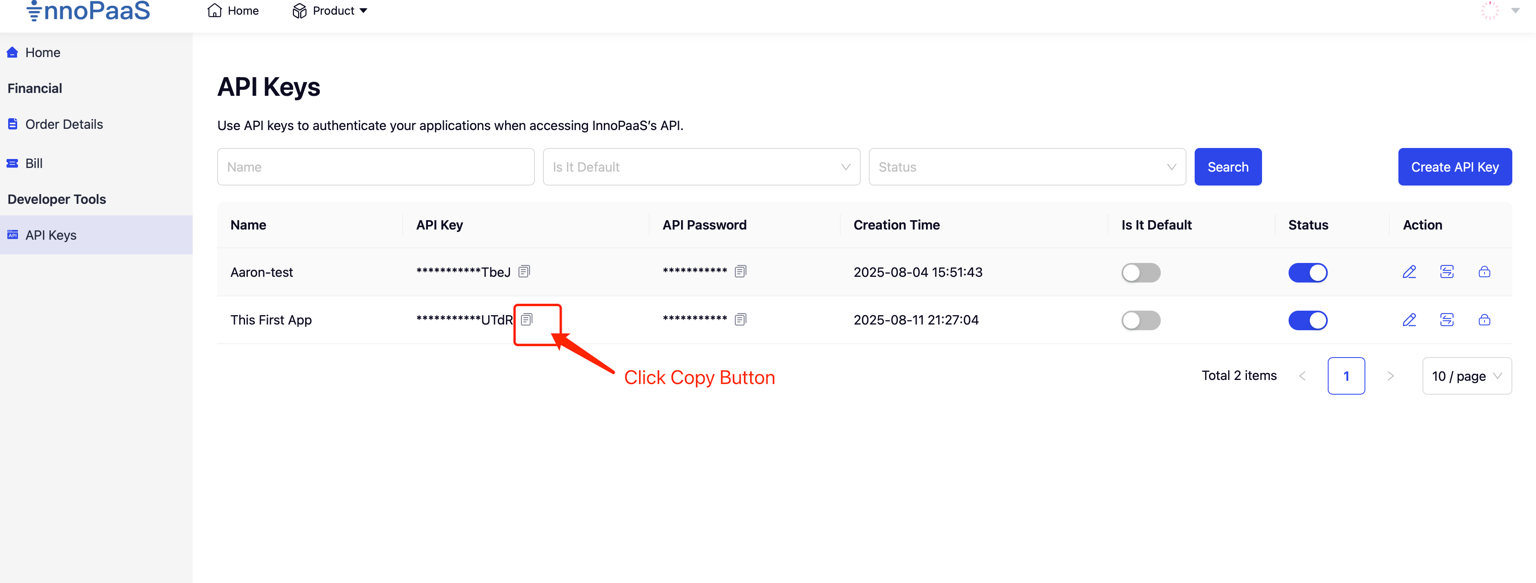
点击应用列表 中的【复制按钮】，复制出AppKey

<figure><img src="/files/Z3lRBlsqV69VR4zDUuuD" alt=""><figcaption></figcaption></figure>

### 获取Authorization

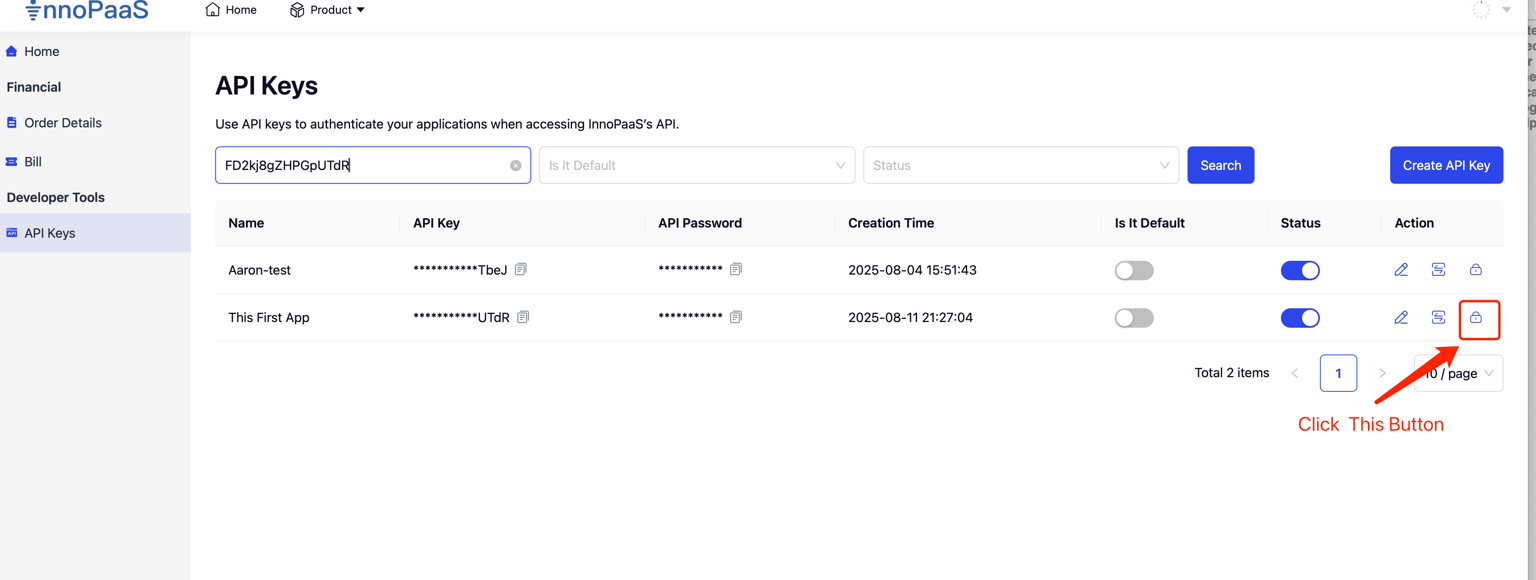
1、选择应用 获取【Token按钮】，生产App访问接口需要的Authorization信息，**我们不会存储客户的Token信息，每次生成，将导致之前生成的Token失效，如果该App的Token已经在您的生产环境中使用，请慎重使用此功能，原有Token失效，可能将会导致无法正常访问API。**

<figure><img src="/files/TlZVxwI7sBV48lPLQJpZ" alt=""><figcaption></figcaption></figure>

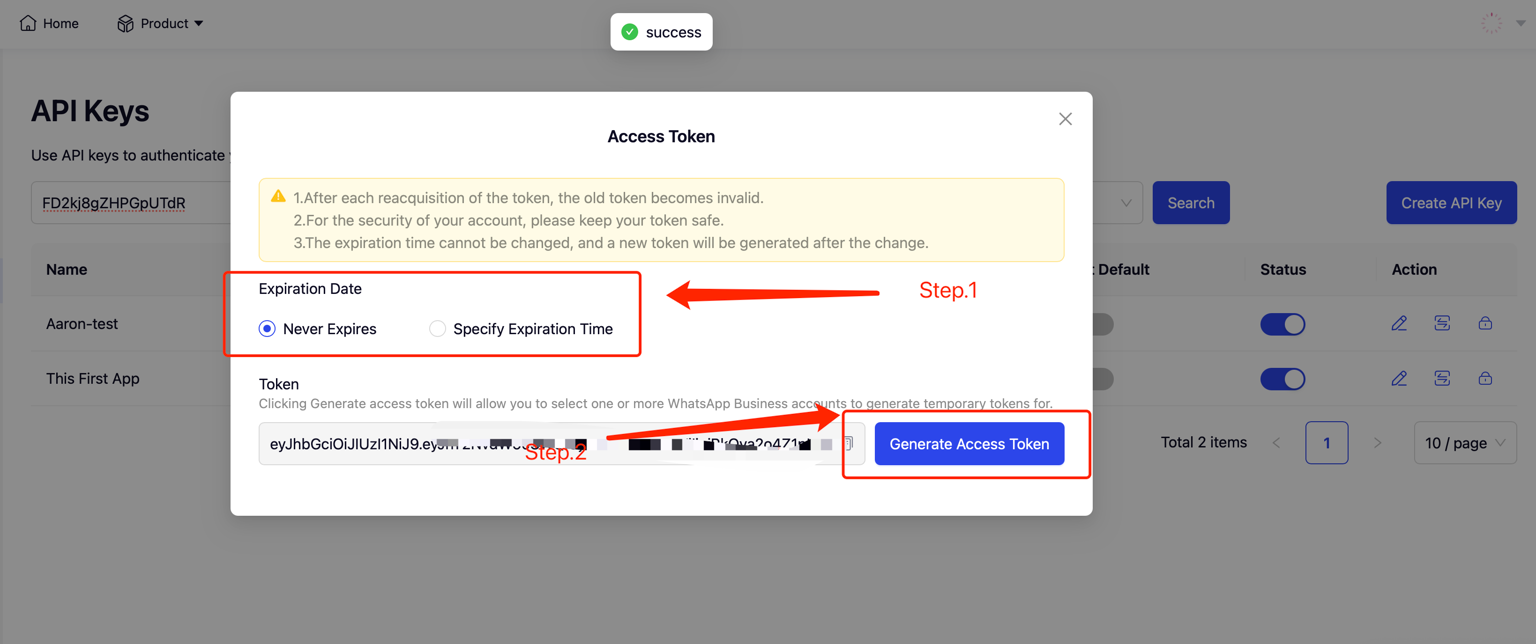
2、生成并复制Token

* 选择Token过期时间，默认 永不过期，也可以指定过期日期。 &#x20;
* 点击【创建访问Token】按钮，生成Token &#x20;
* 点击【复制按钮】，复制Token

<figure><img src="/files/Ywp3DxMgHEVOzGgGVOWe" alt=""><figcaption></figcaption></figure>

## 配置WebHook回调地址

### 配置WebHook事件

&#x20; **在推送模板、上行回复等信事件时，当无法识别或匹配到App时，数据将推送到默认应用，此时如果没有默认应用，将不推送。** &#x20;

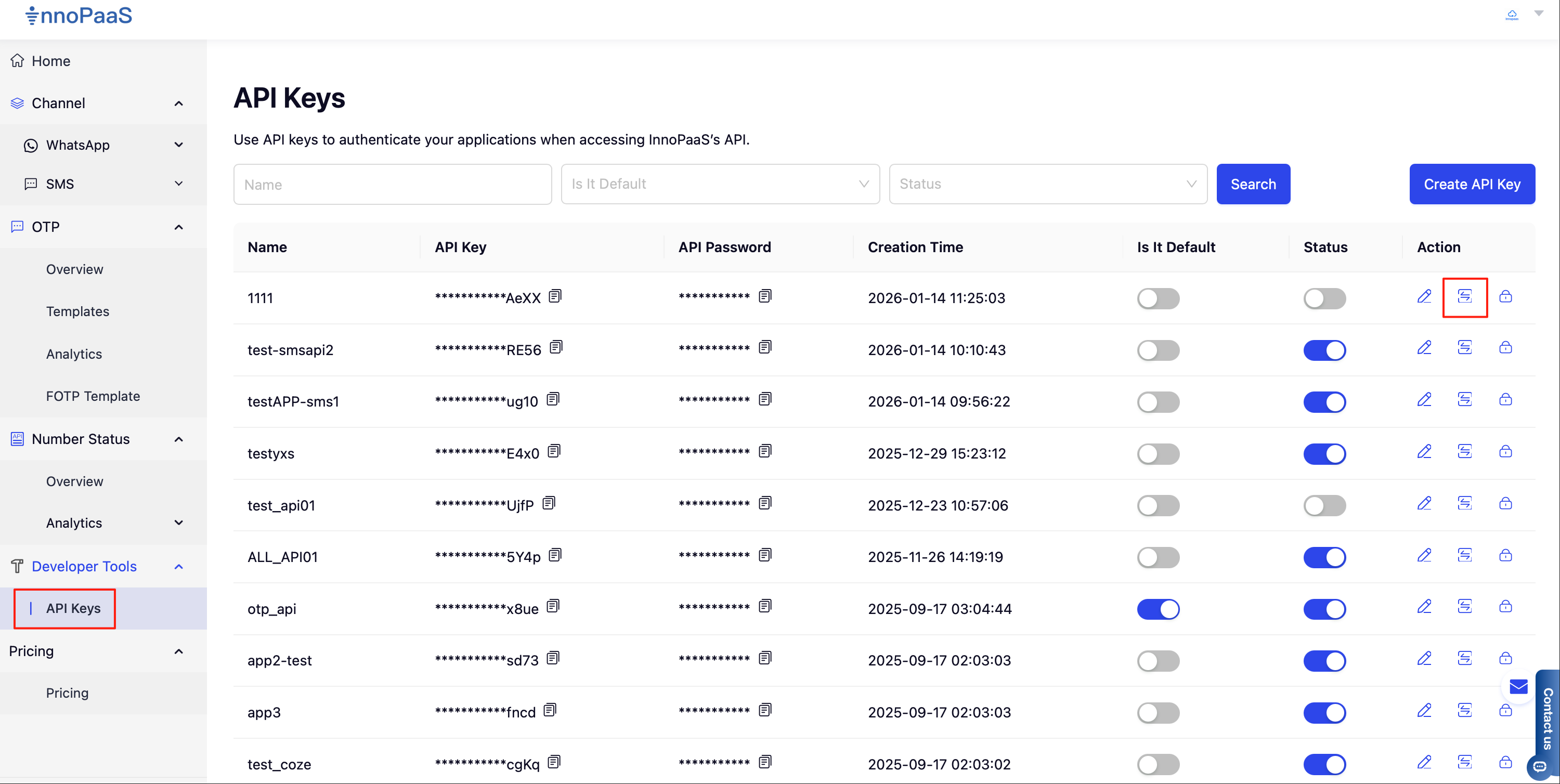
1、 在API Keys功能菜单列表，点击回调事件配置按钮，开始进行配置

<figure><img src="/files/PEEHPiSKPuFFQ9Qw6L0I" alt=""><figcaption></figcaption></figure>

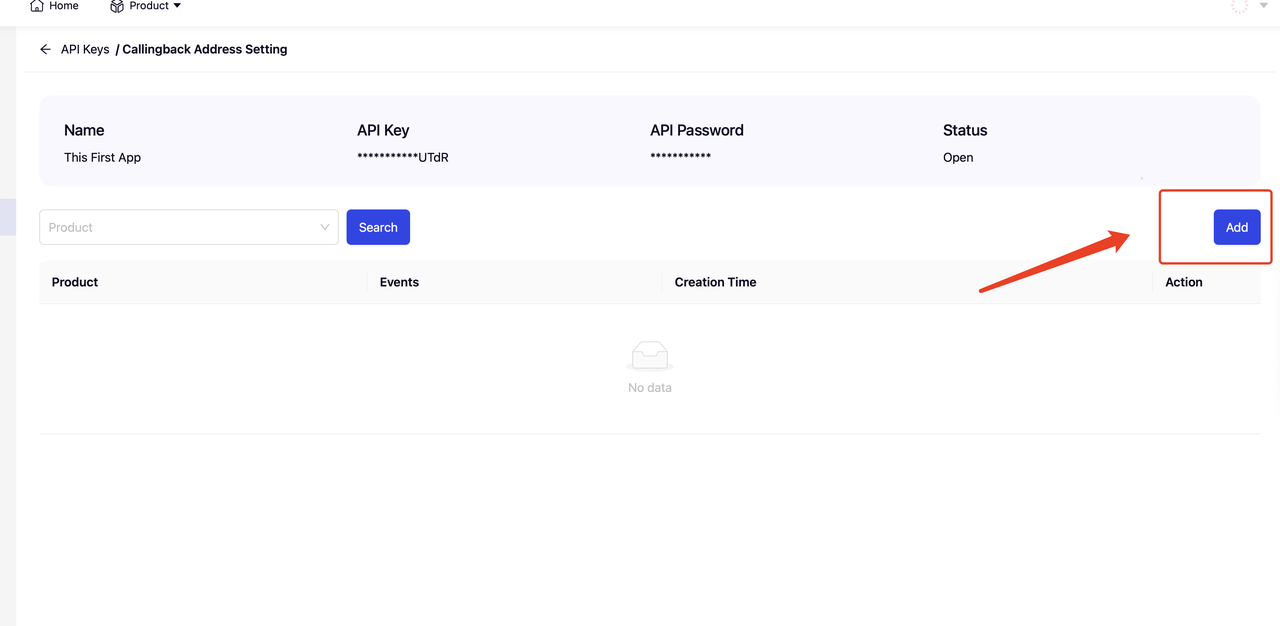
2、点击【Add】按钮进行添加

<figure><img src="/files/b4JL1y9drFKLpw6nviSL" alt=""><figcaption></figcaption></figure>

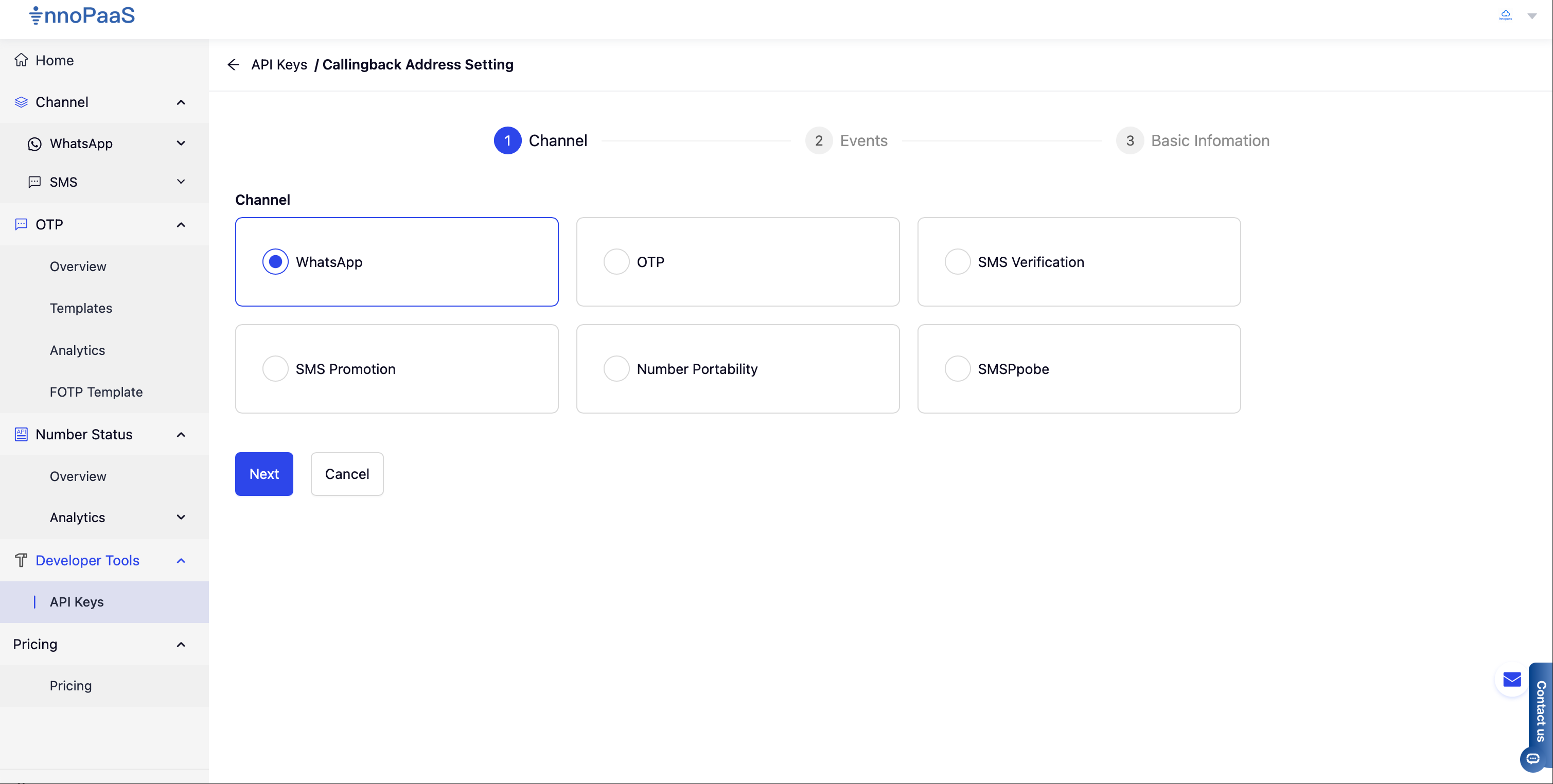
3、从可用产品列表中选择需要配置的WebHook的产品

<figure><img src="/files/rMZqIWqbttHi0vh2Yccj" alt=""><figcaption></figcaption></figure>

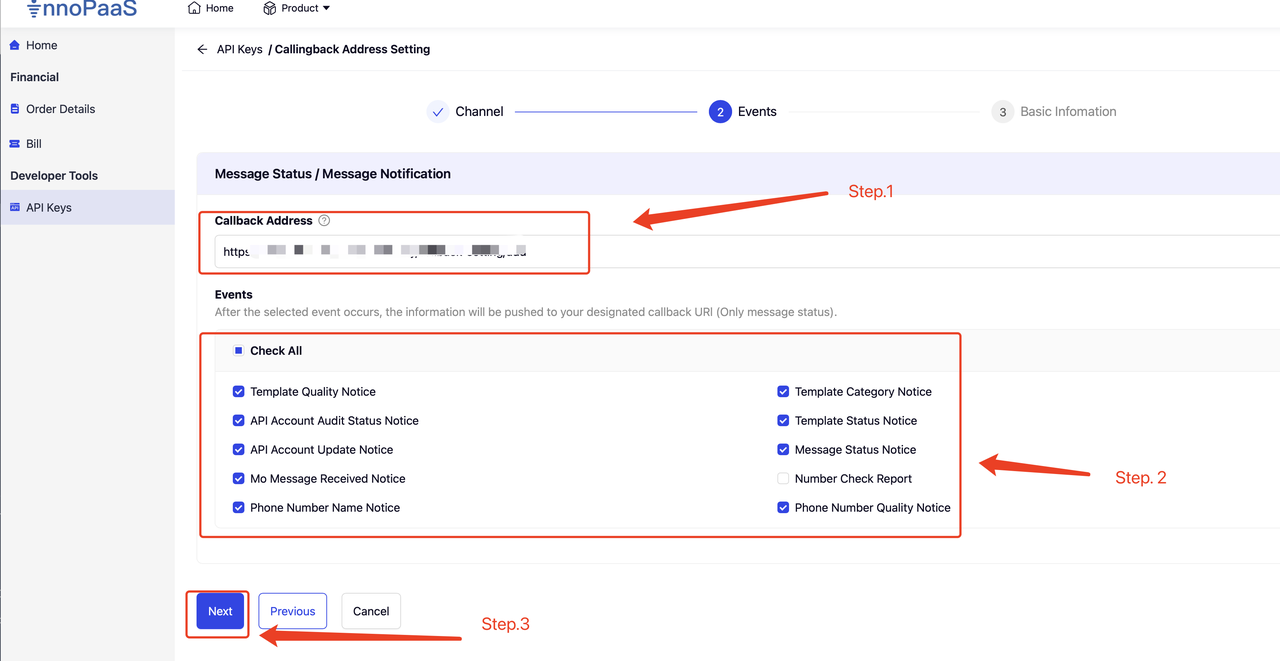
4、配置回调地址，并配置选择需要接收的事件，点击Next进行下一步

<figure><img src="/files/BsfrX75cS3ph5CwcZ9eR" alt=""><figcaption></figcaption></figure>

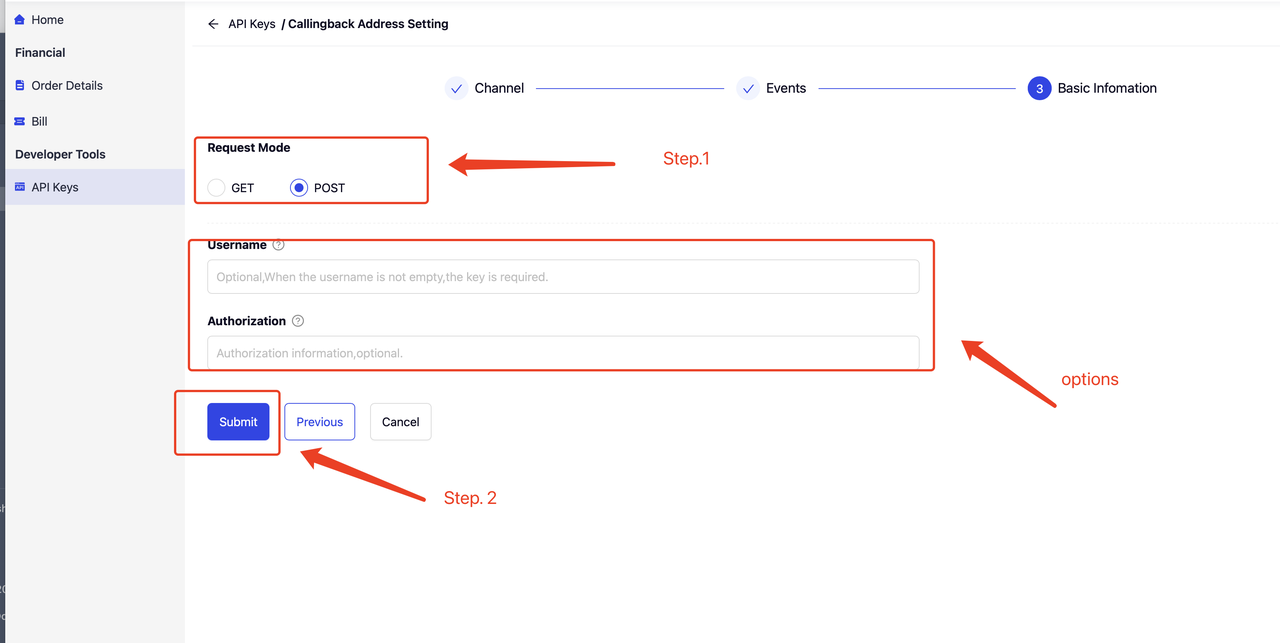
5、选址回调请求方式，默认POST，如果客户业务系统需要对Webhook的来源进行验签，可以配置UserName和Authorization 头信息，在WebHook 通知推送时，将会在头信息中添加UserName和Authorization，将客户配置的信息一起推送到客户系&#x7EDF;**。**

<figure><img src="/files/f8JLK7oF0FPEWtfak20S" alt=""><figcaption></figcaption></figure>


---

# Agent Instructions: Querying This Documentation

If you need additional information that is not directly available in this page, you can query the documentation dynamically by asking a question.

Perform an HTTP GET request on the current page URL with the `ask` query parameter:

```
GET https://docs.innopaas.com/api-reference/overview/innopaas-api-ru-men-zhi-nan.md?ask=<question>
```

The question should be specific, self-contained, and written in natural language.
The response will contain a direct answer to the question and relevant excerpts and sources from the documentation.

Use this mechanism when the answer is not explicitly present in the current page, you need clarification or additional context, or you want to retrieve related documentation sections.