# Top-up

Currently, the InnoPaaS platform supports wallet top-up and product top-up.

**Wallet Recharge**: Supports recharging wallet balance to other products.

**Product Recharge**: Only available for use with the current product. If you recharge $100 to WhatsApp, it can only be used within the WhatsApp product.

## Wallet Recharge

Click "TOP UP" on the Home page.

<figure><img src="https://2999845799-files.gitbook.io/~/files/v0/b/gitbook-x-prod.appspot.com/o/spaces%2FCJHnirvoJ8SyRLQfOW4Z%2Fuploads%2F1e00F1c6WoMnV5KJ75XR%2Fimage.png?alt=media&#x26;token=b2e56e98-bffb-489b-a2f6-1f7407cc6d49" alt=""><figcaption></figcaption></figure>

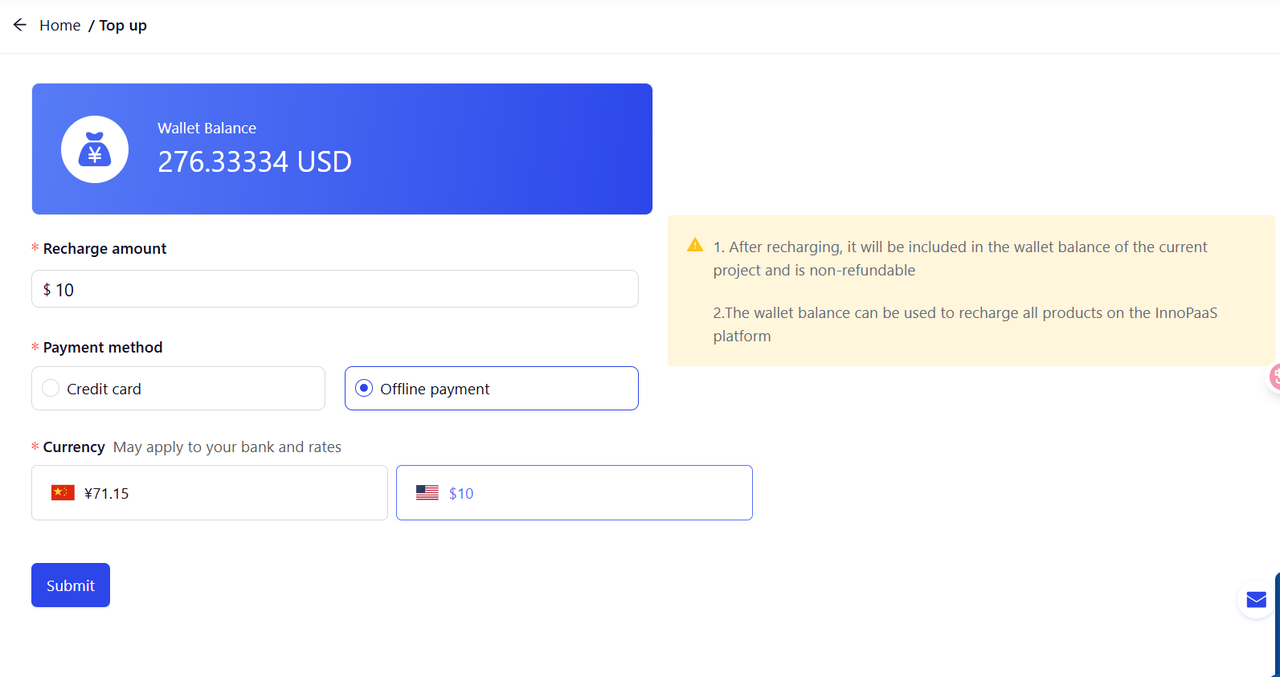
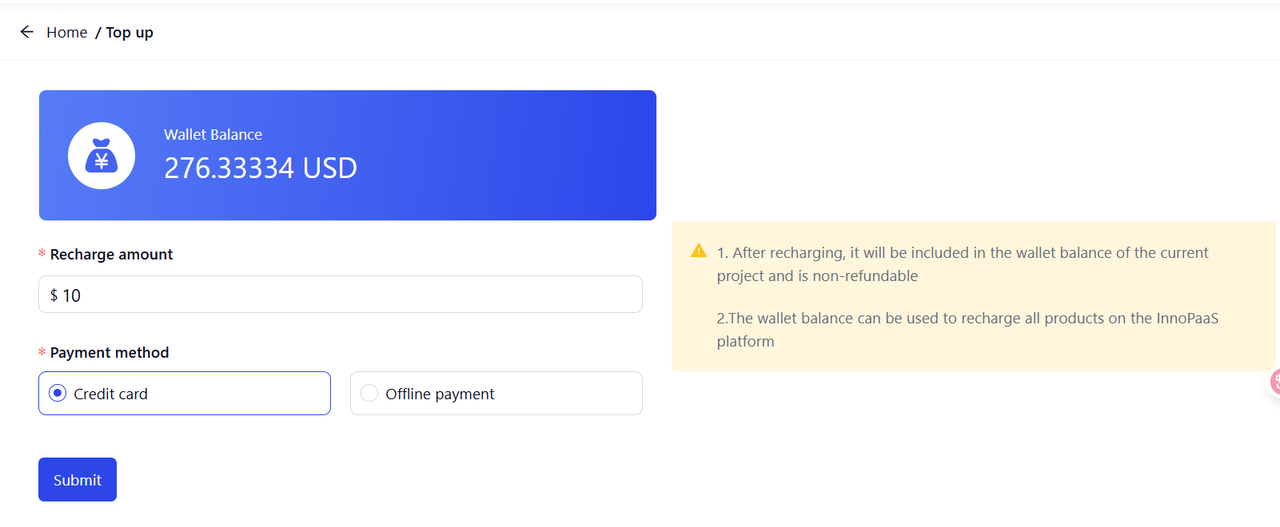
Currently, we support two methods: credit card recharge and offline recharge. We highly recommend that you use credit card recharge.

<figure><img src="https://2999845799-files.gitbook.io/~/files/v0/b/gitbook-x-prod.appspot.com/o/spaces%2FCJHnirvoJ8SyRLQfOW4Z%2Fuploads%2FtecOMtrjqiPgTPdvXveW%2Fimage.png?alt=media&#x26;token=7fbf488e-5bb3-4412-86db-54482a8657b9" alt=""><figcaption></figcaption></figure>

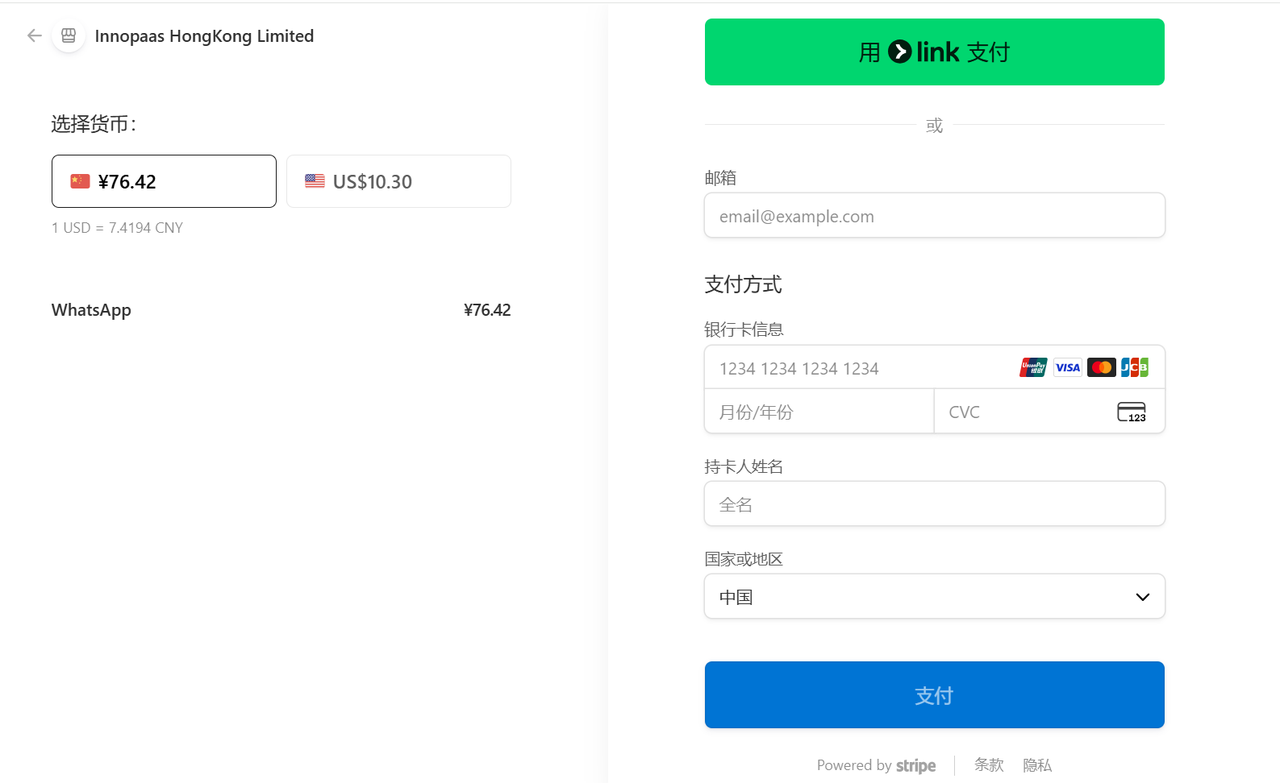
Click "Submit" to enter the recharge page, fill in your email and payment information, and click "Pay".

<figure><img src="https://2999845799-files.gitbook.io/~/files/v0/b/gitbook-x-prod.appspot.com/o/spaces%2FCJHnirvoJ8SyRLQfOW4Z%2Fuploads%2F9t0JGnO4YgugqqrIf11E%2Fimage.png?alt=media&#x26;token=290b7d36-82f1-4313-80bf-f00e39b8ccdb" alt=""><figcaption></figcaption></figure>

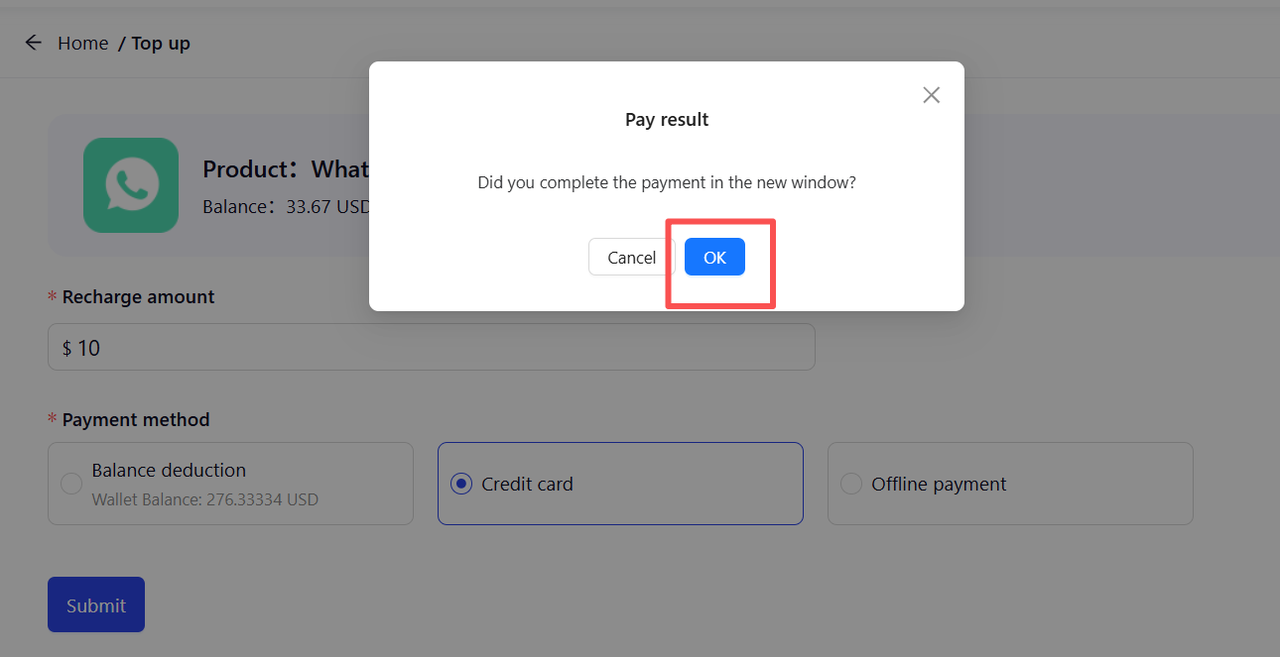
After payment, return to the InnoPaaS platform to check the balance and orders.

<figure><img src="https://2999845799-files.gitbook.io/~/files/v0/b/gitbook-x-prod.appspot.com/o/spaces%2FCJHnirvoJ8SyRLQfOW4Z%2Fuploads%2FK9OfEnEiu0ibB2cLbKYz%2Fimage.png?alt=media&#x26;token=ce558b76-e4d2-4837-8a21-63f248479627" alt=""><figcaption></figcaption></figure>

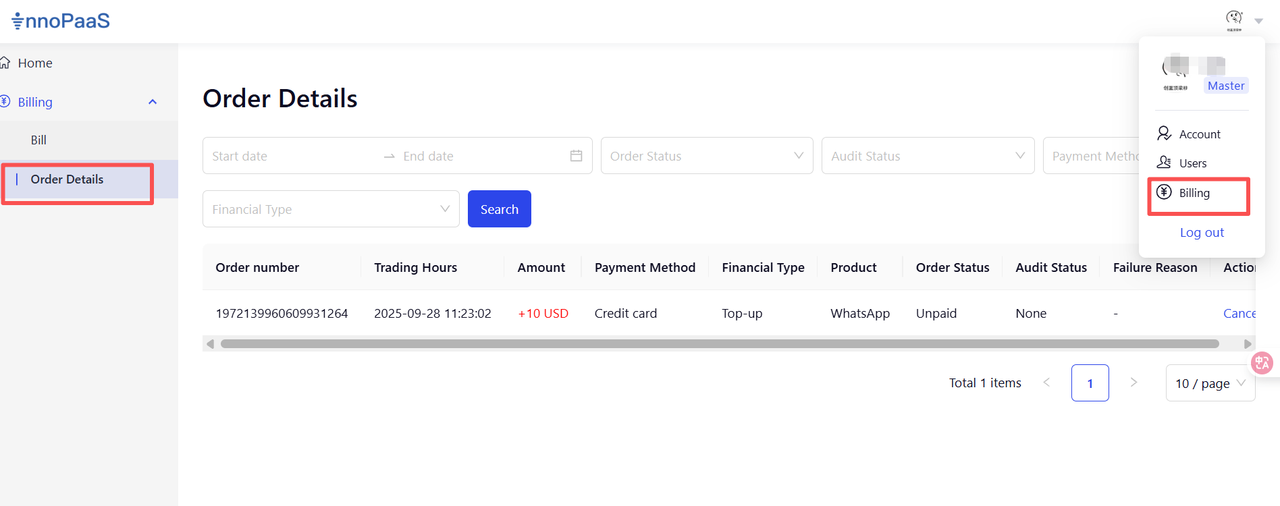
Click "Billing" - "Order Details" to view the order status and details.

<figure><img src="https://2999845799-files.gitbook.io/~/files/v0/b/gitbook-x-prod.appspot.com/o/spaces%2FCJHnirvoJ8SyRLQfOW4Z%2Fuploads%2FKGOMfiBMRgnL7sPNKOSP%2Fimage.png?alt=media&#x26;token=34740add-be31-4fc6-89de-8c06a3b458fa" alt=""><figcaption></figcaption></figure>

Offline recharge supports RMB and USD recharge. If you have any questions during the recharge process, please [contact our team](https://docs.innopaas.com/documentation/documentation-en/help-and-support/innopaas-team).

<figure><img src="https://2999845799-files.gitbook.io/~/files/v0/b/gitbook-x-prod.appspot.com/o/spaces%2FCJHnirvoJ8SyRLQfOW4Z%2Fuploads%2FS7F0spLzXS6293fpgS1o%2Fimage.png?alt=media&#x26;token=fbbad2df-e115-48a1-887a-3b7434169b74" alt=""><figcaption></figcaption></figure>

## Product Recharge

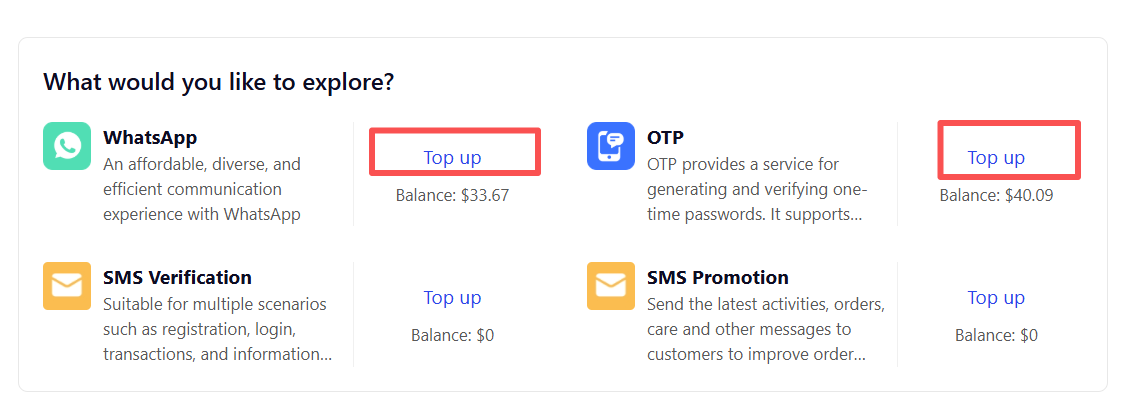
Select the product you want to recharge, click the "Top up" button, and enter the recharge page.

<figure><img src="https://2999845799-files.gitbook.io/~/files/v0/b/gitbook-x-prod.appspot.com/o/spaces%2FCJHnirvoJ8SyRLQfOW4Z%2Fuploads%2FdJ8aA83krGxu3RLn2bes%2Fimage.png?alt=media&#x26;token=318b2a2c-5af6-4d21-9a58-5b786678ee4b" alt=""><figcaption></figcaption></figure>

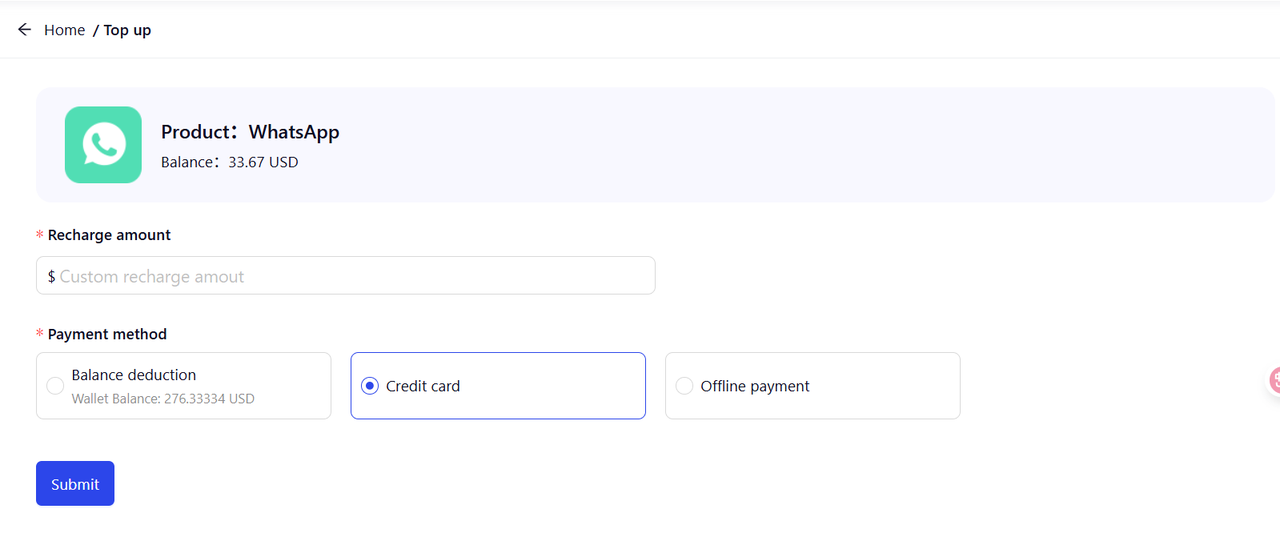
Currently, three recharge methods are supported: credit card recharge, offline recharge, and balance recharge. We highly recommend that you use credit card recharge or balance recharge.

<figure><img src="https://2999845799-files.gitbook.io/~/files/v0/b/gitbook-x-prod.appspot.com/o/spaces%2FCJHnirvoJ8SyRLQfOW4Z%2Fuploads%2FlO20wsKUleFIZEckUpYB%2Fimage.png?alt=media&#x26;token=5eec3213-92be-4f1d-bbaa-6d7339f41c0f" alt=""><figcaption></figcaption></figure>