# Onboarding WhatsApp Business app users - "Coexistence"

## 1. Binding process

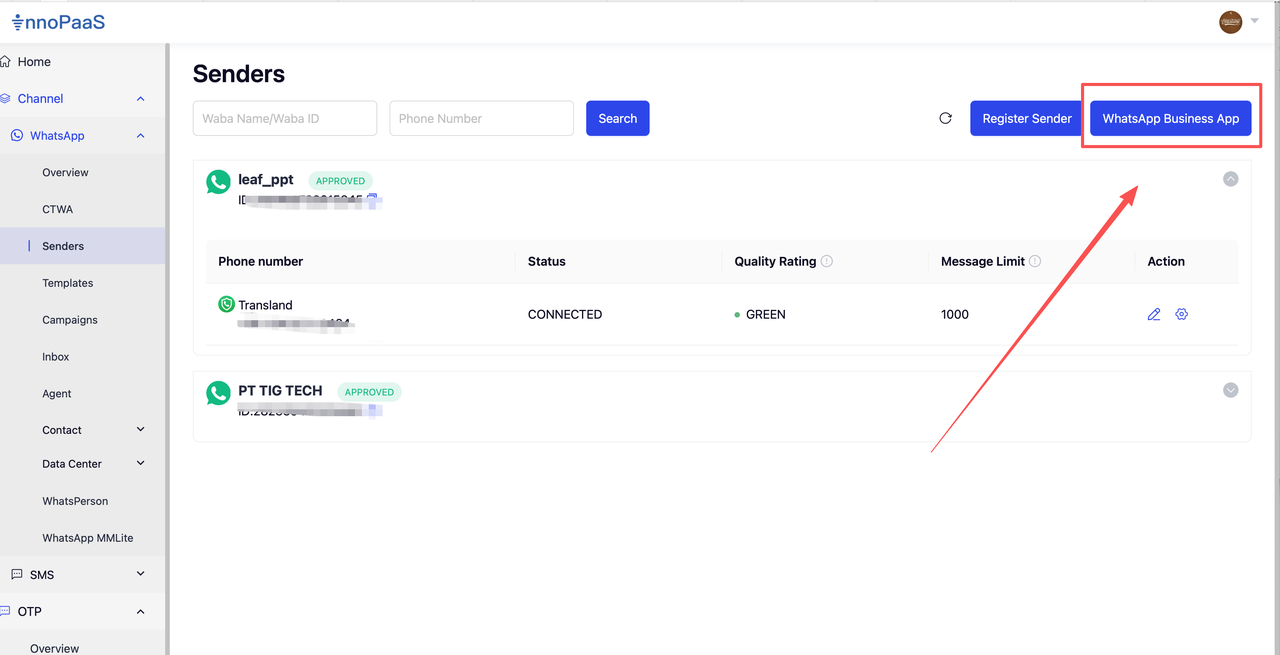
### **1. Visit the InnoPaaS platform**

Go to the Sender menu and click WhatsApp Business App

<figure><img src="https://2999845799-files.gitbook.io/~/files/v0/b/gitbook-x-prod.appspot.com/o/spaces%2FCJHnirvoJ8SyRLQfOW4Z%2Fuploads%2FZqG1qf4cdFlcqZ1UqheM%2Fimage.png?alt=media&#x26;token=4472acf2-31dd-4c46-9f46-97ec450a2e62" alt=""><figcaption></figcaption></figure>

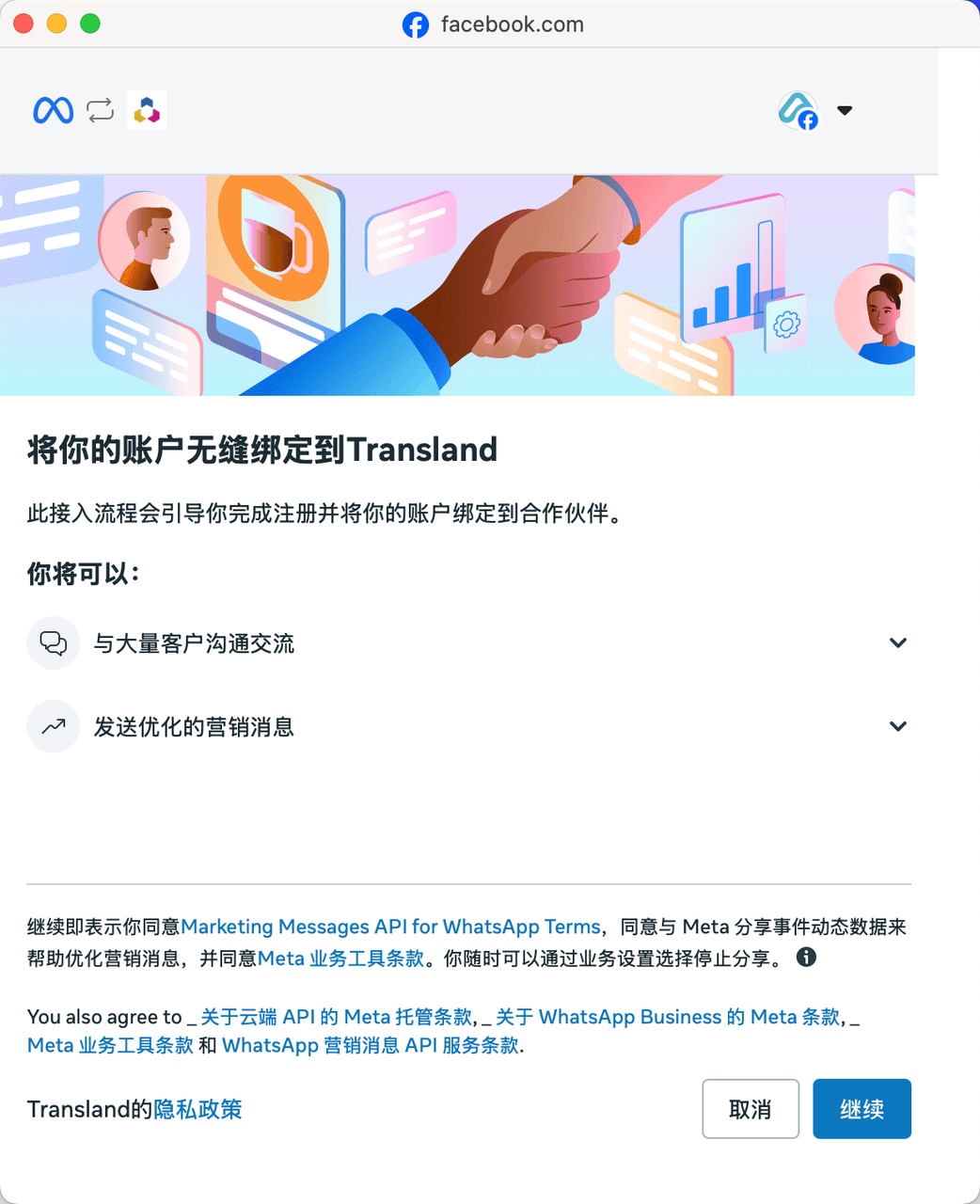
### **2. Log in with a Facebook account**

On the login authorization page, click Continue

<figure><img src="https://2999845799-files.gitbook.io/~/files/v0/b/gitbook-x-prod.appspot.com/o/spaces%2FCJHnirvoJ8SyRLQfOW4Z%2Fuploads%2FNNB5gQpDbDpUWrOz2zue%2Fimage.png?alt=media&#x26;token=dc09c0ed-dc44-499c-8956-c645364f1815" alt="" width="375"><figcaption></figcaption></figure>

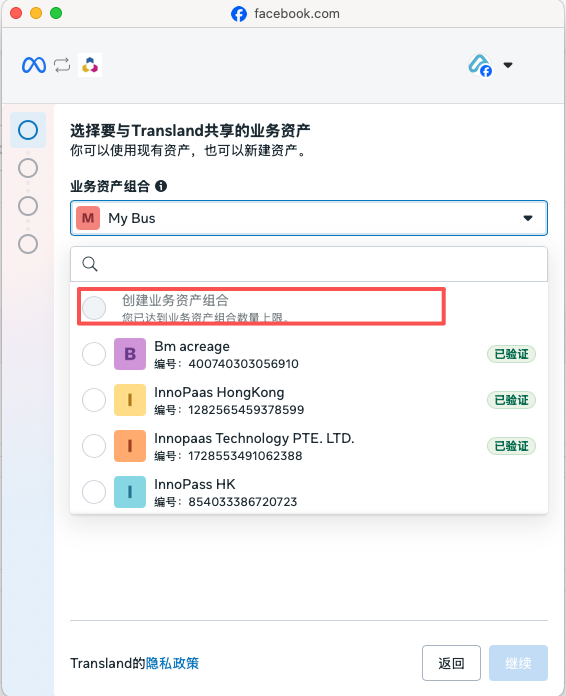
### **3. Select a business asset group**

If available, you can choose to create an asset group

<figure><img src="https://2999845799-files.gitbook.io/~/files/v0/b/gitbook-x-prod.appspot.com/o/spaces%2FCJHnirvoJ8SyRLQfOW4Z%2Fuploads%2FJ6UttIWhPZdxreIChxeH%2Fimage.png?alt=media&#x26;token=982d6890-14ee-409f-a050-1f99e28e90b4" alt="" width="283"><figcaption></figcaption></figure>

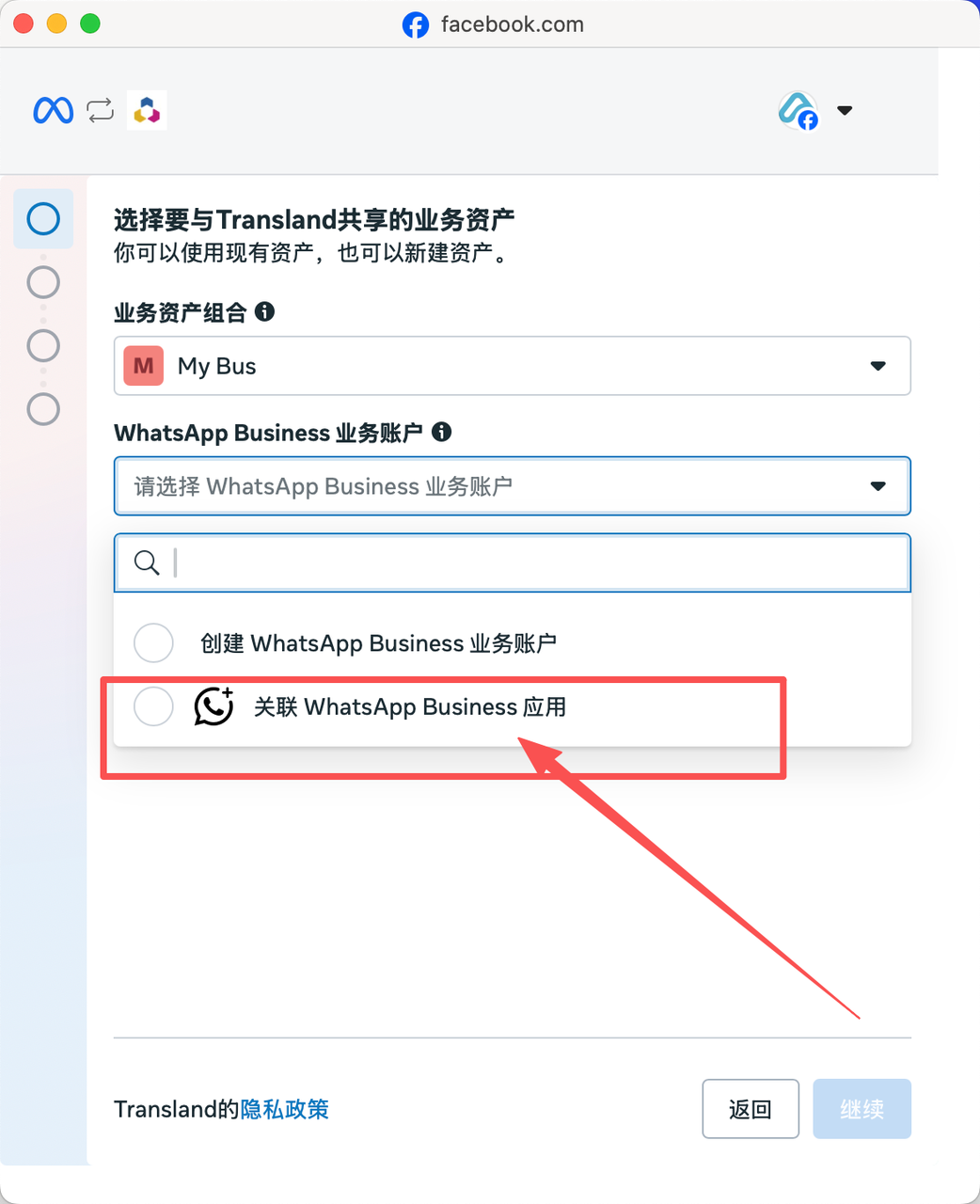
### **4. Select the associated WhatsApp Business app**

<figure><img src="https://2999845799-files.gitbook.io/~/files/v0/b/gitbook-x-prod.appspot.com/o/spaces%2FCJHnirvoJ8SyRLQfOW4Z%2Fuploads%2FGqFHRc9a8P7ptY3p3i4G%2Fimage.png?alt=media&#x26;token=d85465b3-b715-4a09-8e81-f99d14f4ac65" alt="" width="375"><figcaption></figcaption></figure>

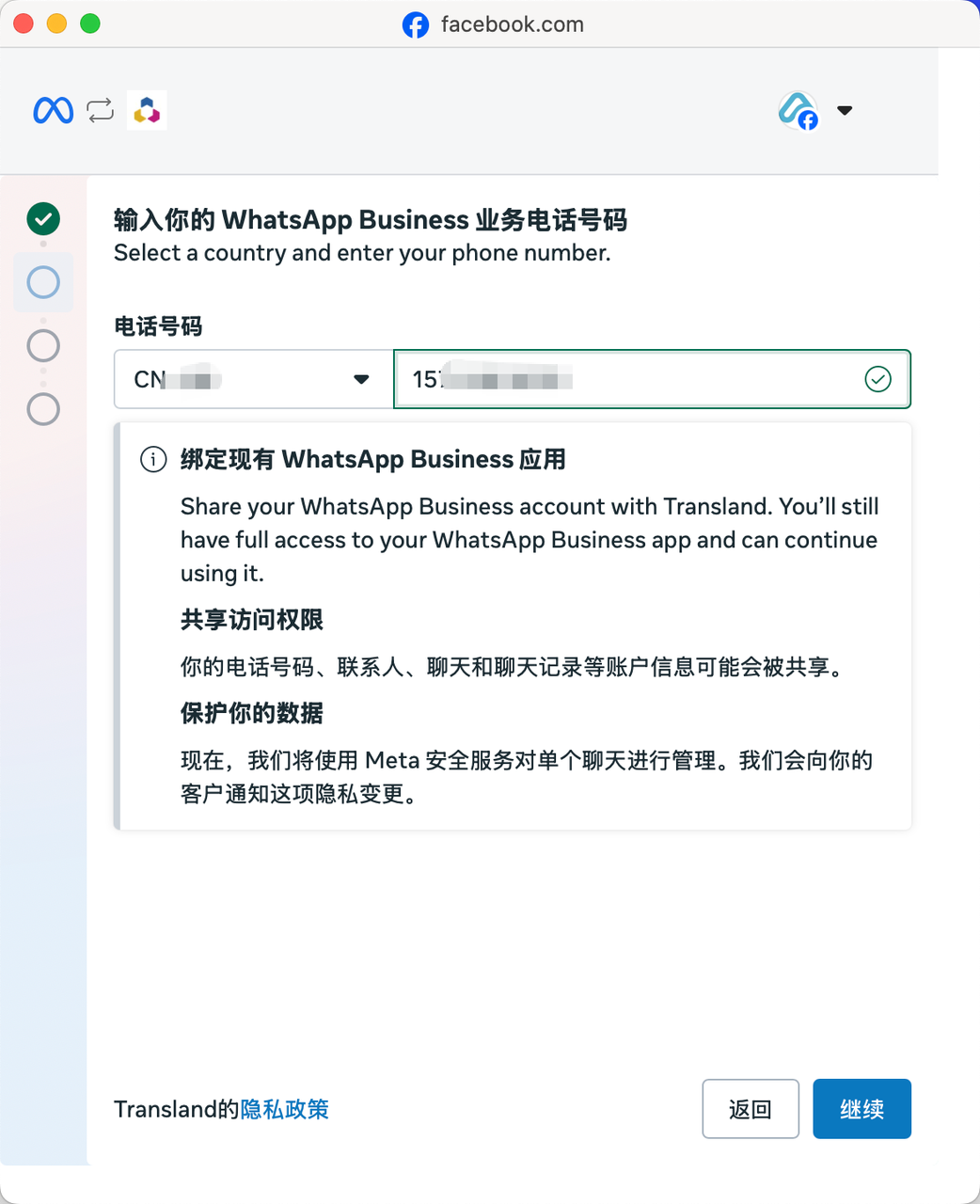
### 5. Enter**WhatsApp Business**number

Enter the number and click \[Continue]

<figure><img src="https://2999845799-files.gitbook.io/~/files/v0/b/gitbook-x-prod.appspot.com/o/spaces%2FCJHnirvoJ8SyRLQfOW4Z%2Fuploads%2FNDnrAov5t72DhOqz9jLO%2Fimage.png?alt=media&#x26;token=1b733366-4354-47f6-9efd-cd0424bf05d6" alt="" width="375"><figcaption></figcaption></figure>

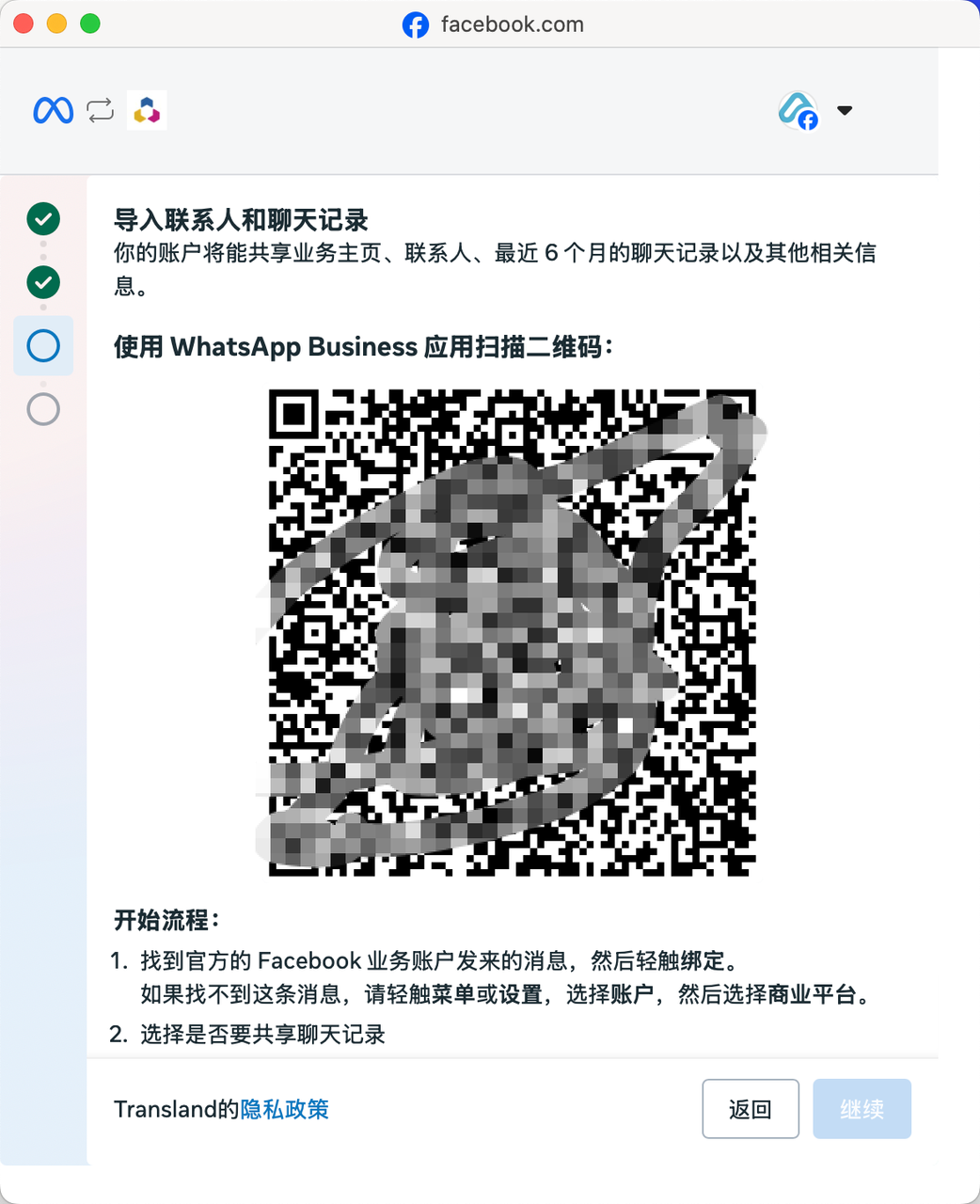
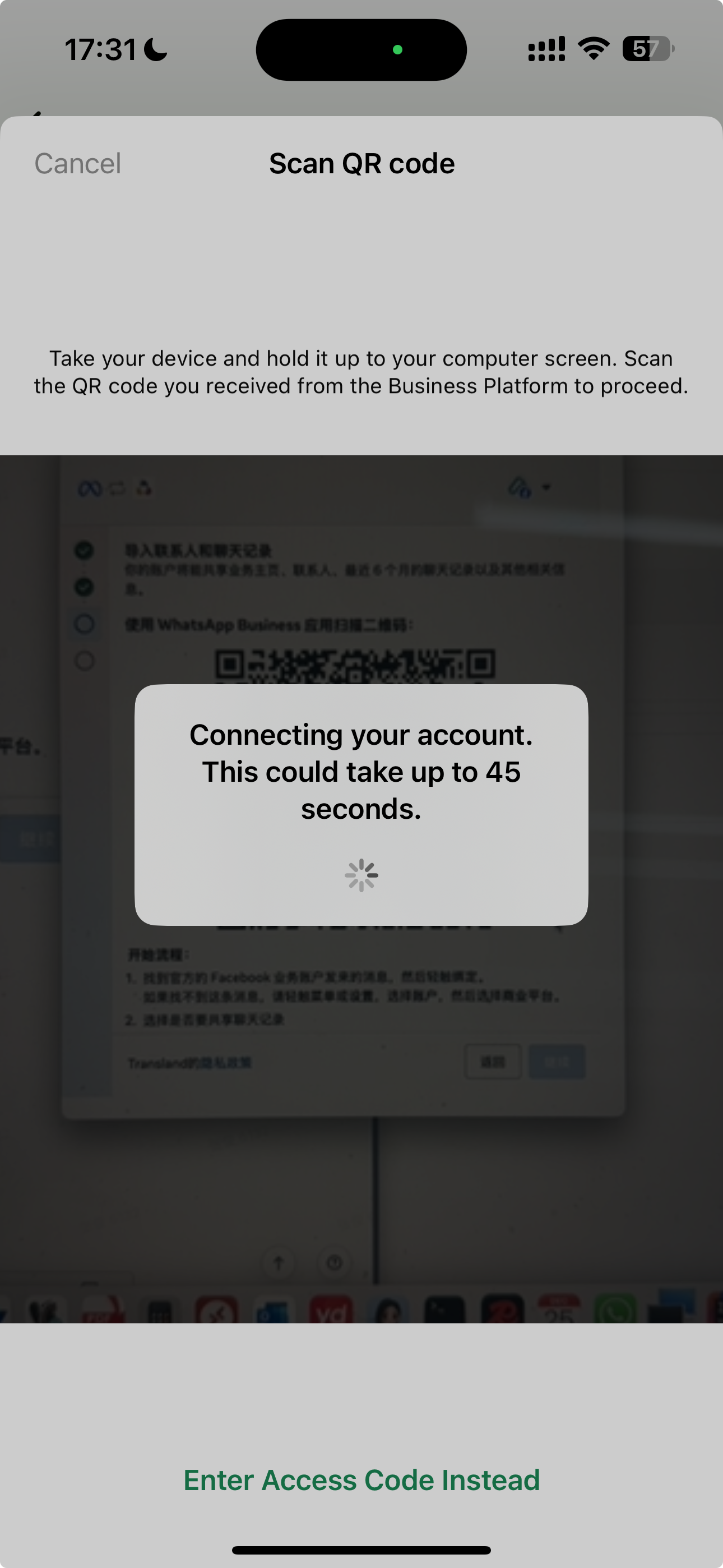
### 6. A QR code is displayed

At this point you need to open your phone, log in to the WhatsApp Business App and scan this code

<figure><img src="https://2999845799-files.gitbook.io/~/files/v0/b/gitbook-x-prod.appspot.com/o/spaces%2FCJHnirvoJ8SyRLQfOW4Z%2Fuploads%2FArCdbcsXy9fxMIorelNn%2Fimage.png?alt=media&#x26;token=34a6f39c-1dd7-443c-8975-2aa86f86c8e9" alt="" width="375"><figcaption></figcaption></figure>

### 7. Open your phone **WhatsApp Business App**

1. Open the app icon below, open the camera in the app's top right corner, and scan the QR code above
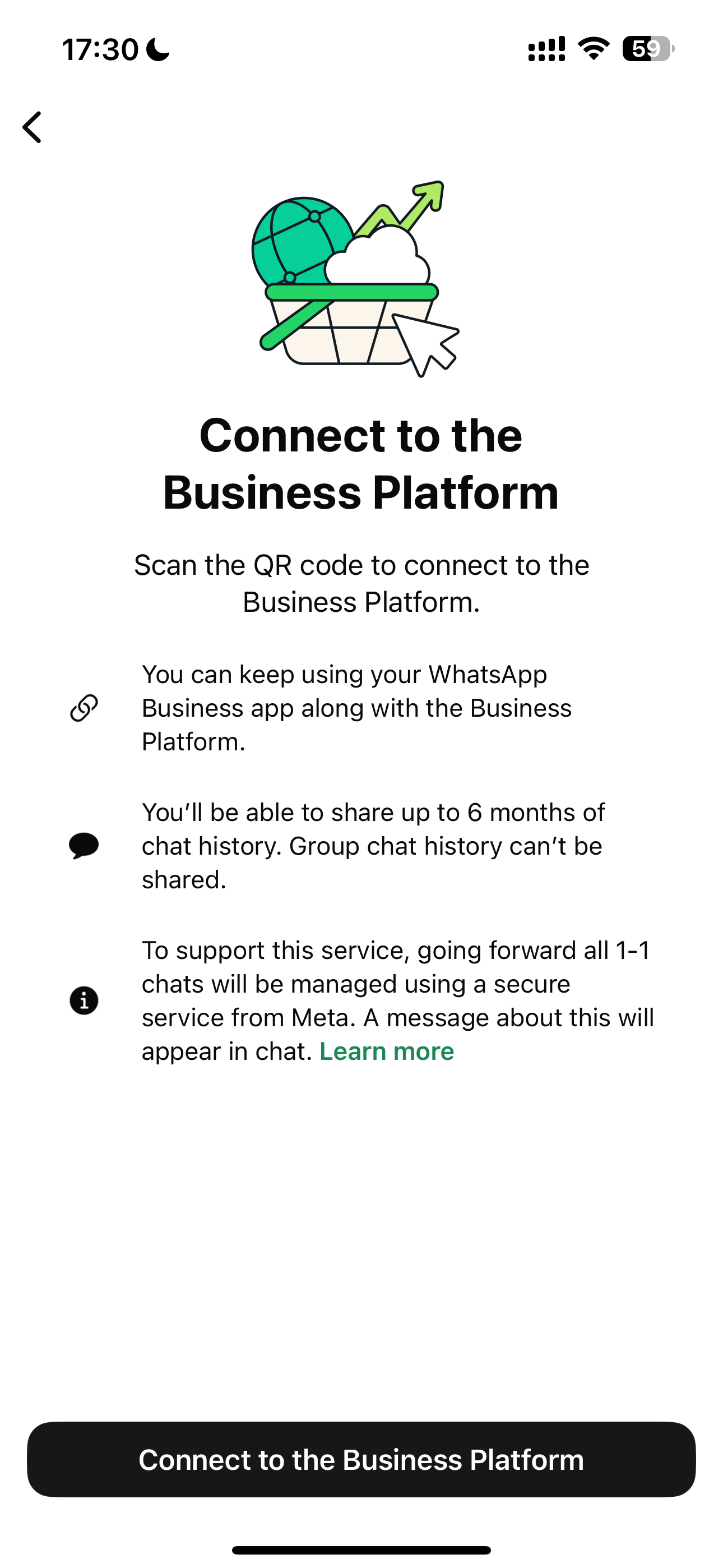
2. After waiting for the right-side interface to pop up, tap Connect to the Business Platform on the phone

<figure><img src="https://2999845799-files.gitbook.io/~/files/v0/b/gitbook-x-prod.appspot.com/o/spaces%2FCJHnirvoJ8SyRLQfOW4Z%2Fuploads%2FotGQSJrvAT0aQqPvYcK4%2Fimage.png?alt=media&#x26;token=48a62539-ea9d-4685-a2d8-56a1f7b4c6d3" alt=""><figcaption></figcaption></figure>

<figure><img src="https://2999845799-files.gitbook.io/~/files/v0/b/gitbook-x-prod.appspot.com/o/spaces%2FCJHnirvoJ8SyRLQfOW4Z%2Fuploads%2Ff20QLcKO5MT88bDQVtYu%2Fimage.png?alt=media&#x26;token=c551bb98-c1ca-4b86-bb4f-9eb3011759e6" alt="" width="375"><figcaption></figcaption></figure>

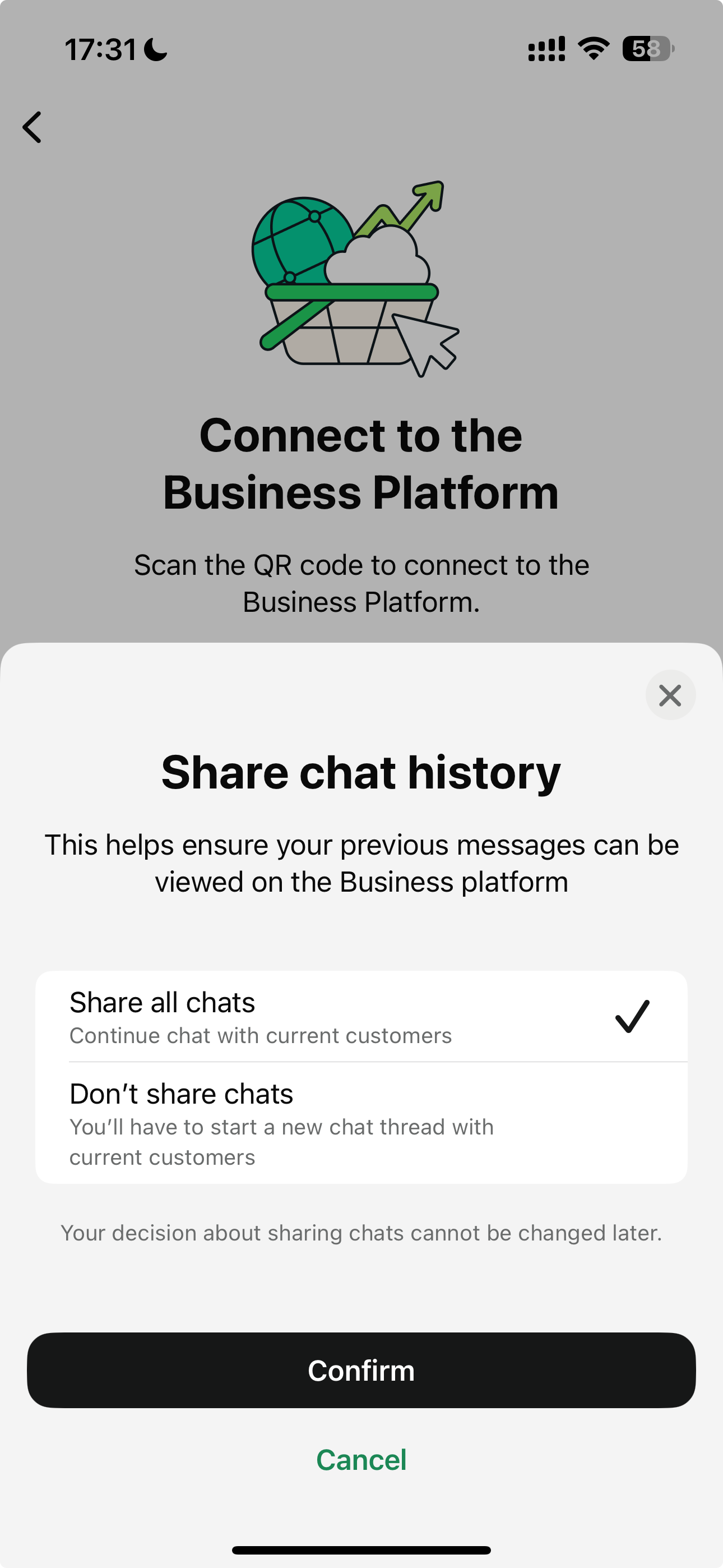
### 8. Choose whether to share chat history

If you choose to share, the system will sync all messages sent or received within the last 180 days.

* Messages in group chats will not be included
* Media messages will not include media material IDs; however, other historical Webhooks containing media message material IDs will be sent separately, but only for media messages sent within 14 days after onboarding
* Disappearing messages are not included

If you choose not to share, chat messages will not be synced.

<figure><img src="https://2999845799-files.gitbook.io/~/files/v0/b/gitbook-x-prod.appspot.com/o/spaces%2FCJHnirvoJ8SyRLQfOW4Z%2Fuploads%2Fq3wbC3thslbLQ7GyOGiL%2Fimage.png?alt=media&#x26;token=8a5075fa-edb9-4460-8847-0d71a3e4977b" alt="" width="375"><figcaption></figcaption></figure>

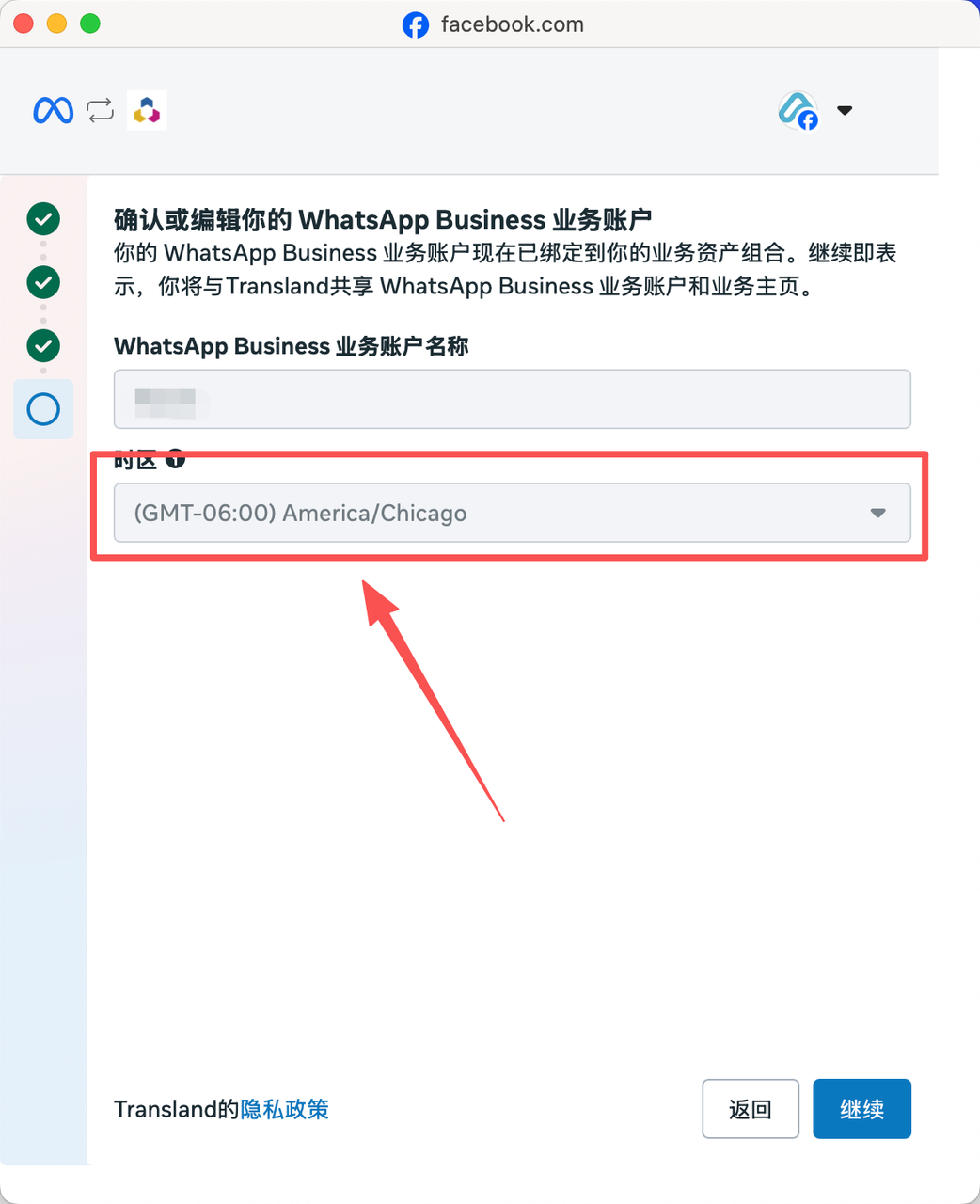
### &#x20;9. Confirm the business account

Scan the QR code again. At this point the InnoPaaS platform will display the business account information for confirmation. If the time zone is empty, please select the time zone of the country where your number is located (time zone is required; otherwise it will affect subsequent InnoPaaS platform approval, and the platform API will not be able to send messages)

<figure><img src="https://2999845799-files.gitbook.io/~/files/v0/b/gitbook-x-prod.appspot.com/o/spaces%2FCJHnirvoJ8SyRLQfOW4Z%2Fuploads%2FROg2eCmueurpcBmeGaq1%2Fimage.png?alt=media&#x26;token=e2a651c5-138e-4e80-a2d8-1e6f61afc3b4" alt="" width="375"><figcaption></figcaption></figure>

<figure><img src="https://2999845799-files.gitbook.io/~/files/v0/b/gitbook-x-prod.appspot.com/o/spaces%2FCJHnirvoJ8SyRLQfOW4Z%2Fuploads%2Fb76ObZeV8NyEzAzdt1c8%2Fimage.png?alt=media&#x26;token=dbe22801-31e2-4e02-aa5a-cbddd8c7a43f" alt="" width="375"><figcaption></figcaption></figure>

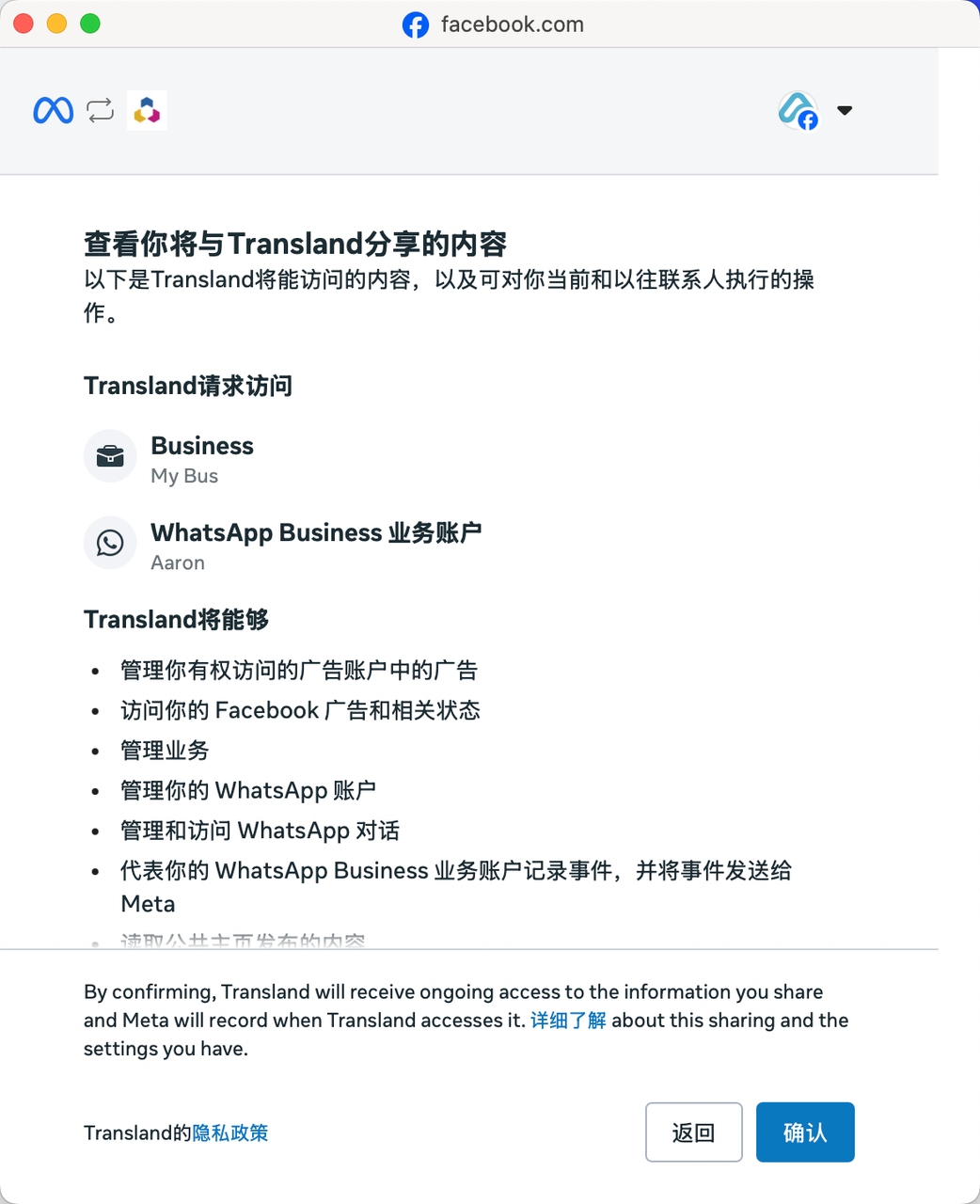
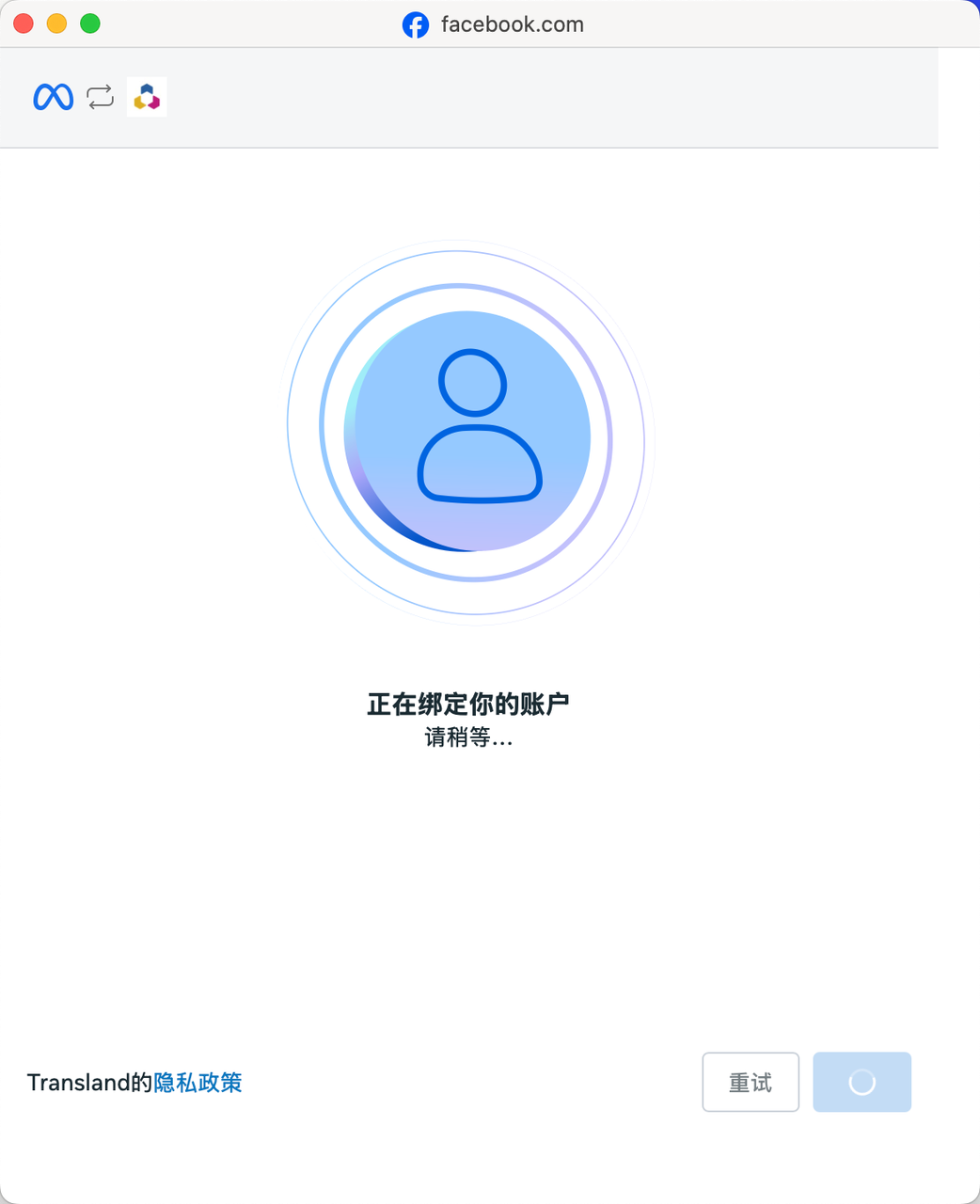
### 10. Click \[Confirm] and wait for Meta to bind the account

<figure><img src="https://2999845799-files.gitbook.io/~/files/v0/b/gitbook-x-prod.appspot.com/o/spaces%2FCJHnirvoJ8SyRLQfOW4Z%2Fuploads%2F8vqmIRG5VYYmyMxpQeZg%2Fimage.png?alt=media&#x26;token=8239ceb8-c8a5-4591-8c3f-6c55228f3c2d" alt="" width="375"><figcaption></figcaption></figure>

<figure><img src="https://2999845799-files.gitbook.io/~/files/v0/b/gitbook-x-prod.appspot.com/o/spaces%2FCJHnirvoJ8SyRLQfOW4Z%2Fuploads%2F6pkSoNndZ9OzxRlXXBv7%2Fimage.png?alt=media&#x26;token=4f6b3f7f-a3d9-4513-88ee-b4d0f67a28f8" alt="" width="375"><figcaption></figcaption></figure>

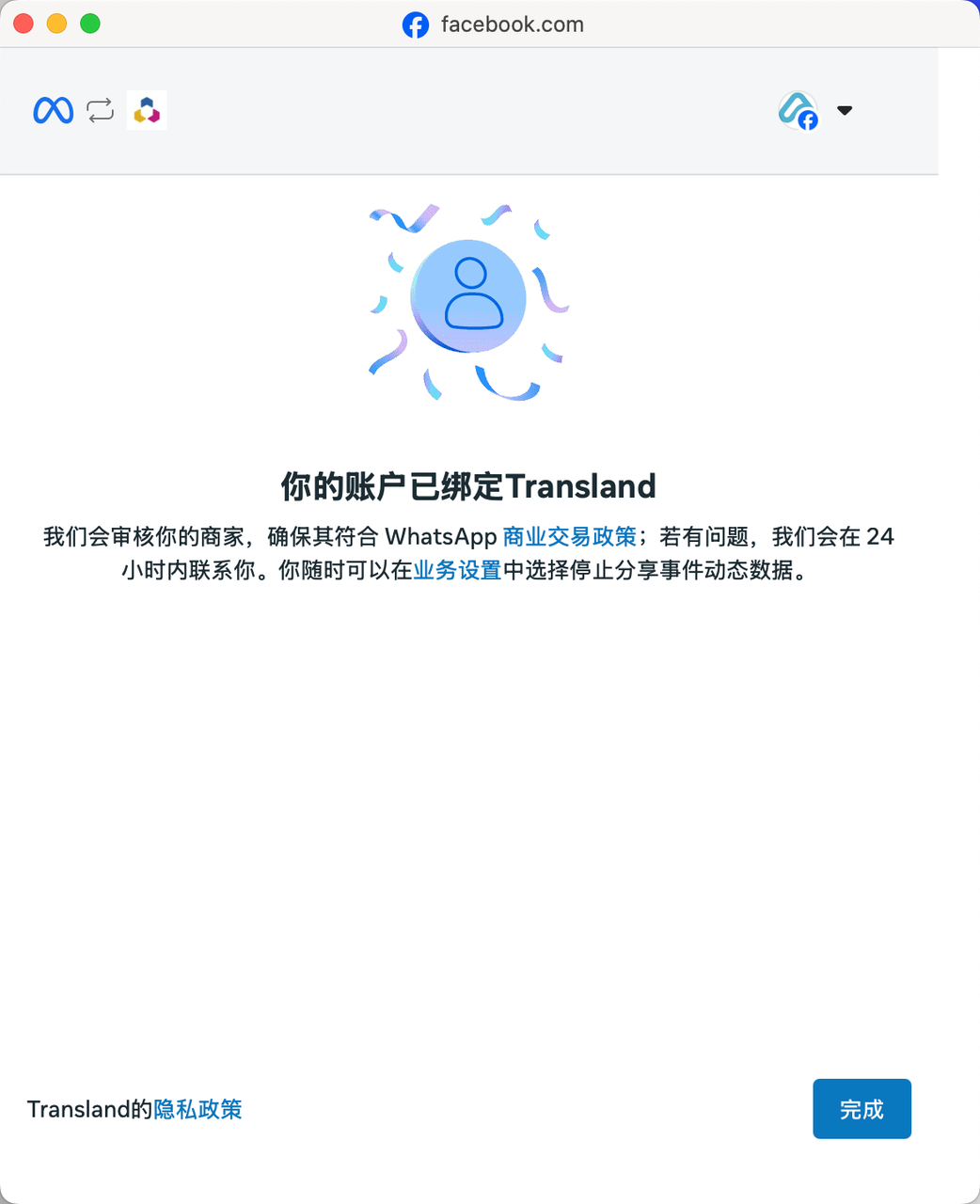
### **11. Click \[Finish] to complete the InnoPaaS information binding**

Click the finish button to complete the final step where InnoPaaS authorizes the number to be bound to the platform account.

<figure><img src="https://2999845799-files.gitbook.io/~/files/v0/b/gitbook-x-prod.appspot.com/o/spaces%2FCJHnirvoJ8SyRLQfOW4Z%2Fuploads%2FejaxrAWZNDw1GslAhxfa%2Fimage.png?alt=media&#x26;token=7fb6c6d6-b5fe-4857-8df9-94246290a6f9" alt="" width="375"><figcaption></figcaption></figure>

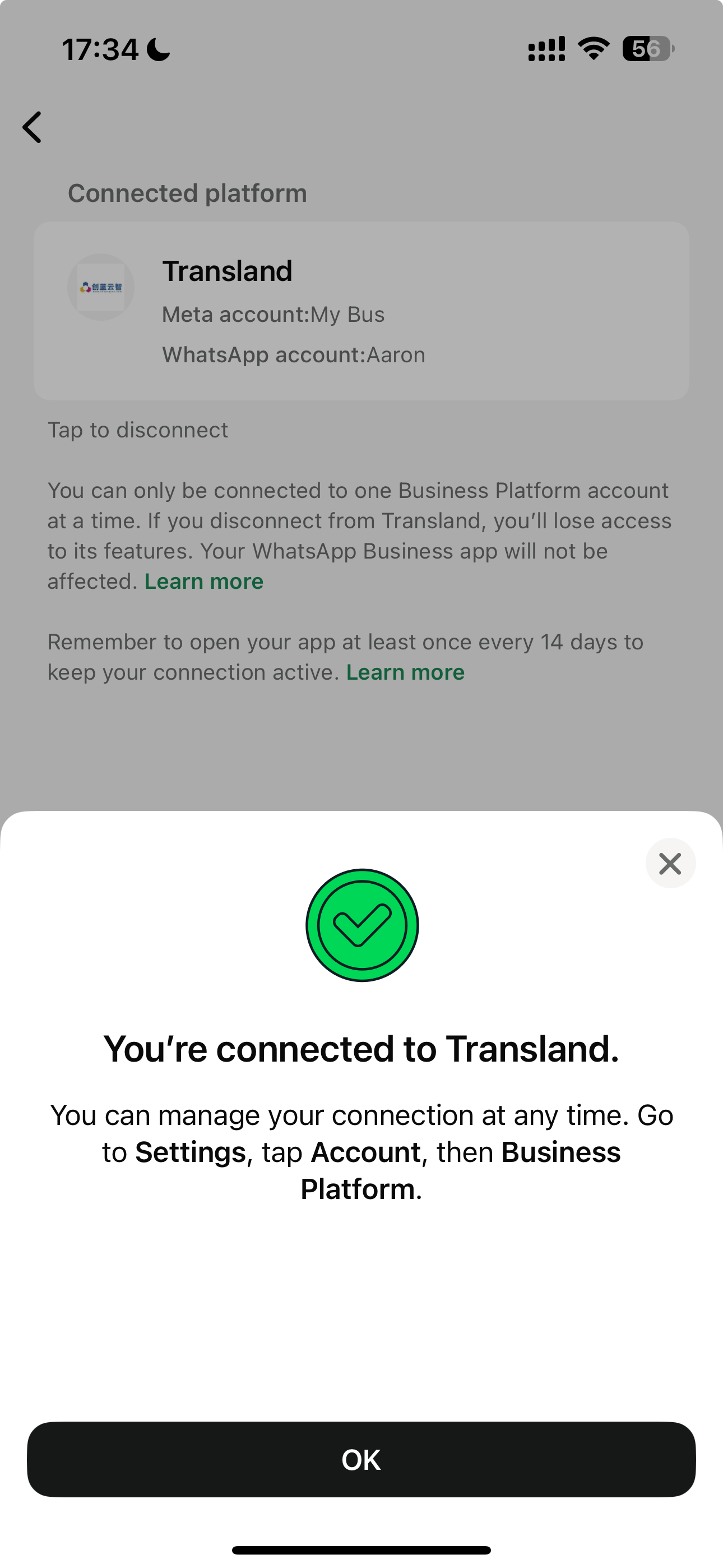
At the same time the phone will also show that the binding is complete.

<figure><img src="https://2999845799-files.gitbook.io/~/files/v0/b/gitbook-x-prod.appspot.com/o/spaces%2FCJHnirvoJ8SyRLQfOW4Z%2Fuploads%2FxPR0wawyLTxCSfRrqurF%2Fimage.png?alt=media&#x26;token=9bedb5cb-c300-4989-a1e8-ef233407f843" alt="" width="375"><figcaption></figcaption></figure>

## 2. Requirements and precautions

### Requirements

* Business clients must use WhatsApp Business app version 2.24.17 or higher.
* The country/region code of the business client's phone number must be supported
* You must know how to use[the Cloud API](https://developers.facebook.com/documentation/business-messaging/whatsapp/about-the-platform#whatsapp-cloud-api)
* You must use embedded registration with[session history](https://developers.facebook.com/documentation/business-messaging/whatsapp/embedded-signup/implementation#session-logging-message-event-listener)included

### Limitations

* To ensure compatibility with the WhatsApp Business app, the throughput for company phone numbers used for both the WhatsApp Business app and the Cloud API is fixed at 20 mps.
* If your business client previously worked with a partner and is still sharing the previous quota, they may see an error message when trying to switch to a new partner. Follow the[guide](https://developers.facebook.com/documentation/business-messaging/whatsapp/solution-providers/support/business-customer-support)to resolve the error.

### Unsupported countries/regions

WhatsApp Business business account phone numbers with country/region codes from the following countries/regions are not supported:

* Nigeria
* South Africa

### Customer service window

[Customer service window](https://developers.facebook.com/documentation/business-messaging/whatsapp/messages/send-messages#customer-service-windows)The customer service window only opens when a WhatsApp user sends a message to a business that has onboarded the Cloud API. If a WhatsApp user sends a message to a business before the business has onboarded the Cloud API, the business can only reply with template messages because the customer service window has not yet opened. If the user sends a message after the business has onboarded the Cloud API, the customer service window will open as usual and the business can reply with non-template messages.

### Feature comparison

The table below describes features available to businesses that have onboarded the Cloud API and any changes to WhatsApp Business app functionality after onboarding.

| Existing features of the WhatsApp Business app                                                                                                                                                                                                                                                                                                                                                                                                   | Changes to WhatsApp Business app features after onboarding to the Cloud API                                                                                  | Are WhatsApp Business app features supported on the Cloud API?                                                                                                      |
| ------------------------------------------------------------------------------------------------------------------------------------------------------------------------------------------------------------------------------------------------------------------------------------------------------------------------------------------------------------------------------------------------------------------------------------------------ | ------------------------------------------------------------------------------------------------------------------------------------------------------------ | ------------------------------------------------------------------------------------------------------------------------------------------------------------------- |
| Individual (one-to-one) chat                                                                                                                                                                                                                                                                                                                                                                                                                     | Message editing/recall is no longer supported.                                                                                                               | Supported. All chat messages from the past 6 months can be synced. Sent and received messages will be mirrored between the Cloud API and the WhatsApp Business app. |
| Contacts                                                                                                                                                                                                                                                                                                                                                                                                                                         | No change.                                                                                                                                                   | Supported. All contacts with WhatsApp phone numbers can be synced.                                                                                                  |
| Group chat                                                                                                                                                                                                                                                                                                                                                                                                                                       | No change.                                                                                                                                                   | Not supported. Group chats will not be synced.                                                                                                                      |
| Disappearing messages                                                                                                                                                                                                                                                                                                                                                                                                                            | Disappearing messages for all individual (one-to-one) chats will be turned off                                                                               | Not supported.                                                                                                                                                      |
| [View-once messages](https://l.facebook.com/l.php?u=https%3A%2F%2Ffaq.whatsapp.com%2F1077018839582332%3Ffbclid%3DIwZXh0bgNhZW0CMTAAYnJpZBExeU9aNUV1VU5ENm9uRXRjSXNydGMGYXBwX2lkEDIyMjAzOTE3ODgyMDA4OTIAAR5y-Uzo5ZkmVuFmJF05X-ZodJOFv5qy6Szzn7IuPSpGed9FSd0f1WVItrnnyw_aem_EFfXe3McKhvlgWwNiLWa0A\&h=AT3SVK_ARUEEoQN7fhu_3-2DHOesq1DQiALCsvV3nInsnbJ4hmIQz4iC4Ycg09YNp6gnUr3MErSA90GSzY-fV9qn-ZBIsoB3ERH3HNtcbdVYtSJXsPiZOJguWos3icU5R2ZCu7y2w4A) | View-once messages for all individual (one-to-one) chats will be disabled                                                                                    | Not supported.                                                                                                                                                      |
| Live location messages                                                                                                                                                                                                                                                                                                                                                                                                                           | Live location messages for all individual (one-to-one) chats will be disabled                                                                                | Not supported.                                                                                                                                                      |
| Broadcast lists                                                                                                                                                                                                                                                                                                                                                                                                                                  | Broadcast list functionality will be deactivated. Businesses will not be able to create new broadcast lists. Existing broadcast lists will become read-only. | Not supported.                                                                                                                                                      |
| Voice and video calls                                                                                                                                                                                                                                                                                                                                                                                                                            | No change.                                                                                                                                                   | Not supported.                                                                                                                                                      |
| Business tools (for example: catalog, orders, status)                                                                                                                                                                                                                                                                                                                                                                                            | No change.                                                                                                                                                   | Not supported.                                                                                                                                                      |
| Messaging tools (for example: marketing messages, greeting messages, away messages, quick replies, labels)                                                                                                                                                                                                                                                                                                                                       | No change.                                                                                                                                                   | Not supported.                                                                                                                                                      |
| Business profile (for example: business name, address, website)                                                                                                                                                                                                                                                                                                                                                                                  | No change.                                                                                                                                                   | Not supported.                                                                                                                                                      |
| Channels                                                                                                                                                                                                                                                                                                                                                                                                                                         | No change.                                                                                                                                                   | Not supported.                                                                                                                                                      |

### Linked devices

Businesses can link up to 4 WhatsApp 'companion' clients to the WhatsApp Business app account on other devices (described in our Help Center as "[Linked devices](https://l.facebook.com/l.php?u=https%3A%2F%2Ffaq.whatsapp.com%2F378279804439436%2F%3Ffbclid%3DIwZXh0bgNhZW0CMTAAYnJpZBExeU9aNUV1VU5ENm9uRXRjSXNydGMGYXBwX2lkEDIyMjAzOTE3ODgyMDA4OTIAAR4Uhro-TNkHNaTLVNiZQQ66w6J2MowNlR2xRMpU7QuavkPtoHORgDUBcvW9hQ_aem_0vJ3pXKy1b3nxzHOBMbMcA\&h=AT3SVK_ARUEEoQN7fhu_3-2DHOesq1DQiALCsvV3nInsnbJ4hmIQz4iC4Ycg09YNp6gnUr3MErSA90GSzY-fV9qn-ZBIsoB3ERH3HNtcbdVYtSJXsPiZOJguWos3icU5R2ZCu7y2w4A)"). All companion clients are supported,[WhatsApp for Windows](https://l.facebook.com/l.php?u=https%3A%2F%2Ffaq.whatsapp.com%2F1317564962315842%2F%3Fcms_platform%3Dwindows-desktop%26fbclid%3DIwZXh0bgNhZW0CMTAAYnJpZBExeU9aNUV1VU5ENm9uRXRjSXNydGMGYXBwX2lkEDIyMjAzOTE3ODgyMDA4OTIAAR5pdklF2cUj6pt_ENI_lrGdS6eMFEBonex_yHlPOVjvetKyqW86ke2_ljNYaA_aem_4DNMDwMM14d-eVnVvFkScQ\&h=AT3SVK_ARUEEoQN7fhu_3-2DHOesq1DQiALCsvV3nInsnbJ4hmIQz4iC4Ycg09YNp6gnUr3MErSA90GSzY-fV9qn-ZBIsoB3ERH3HNtcbdVYtSJXsPiZOJguWos3icU5R2ZCu7y2w4A) and [WhatsApp for Wear OS](https://l.facebook.com/l.php?u=https%3A%2F%2Ffaq.whatsapp.com%2F564431798835071%2F%3Ffbclid%3DIwZXh0bgNhZW0CMTAAYnJpZBExeU9aNUV1VU5ENm9uRXRjSXNydGMGYXBwX2lkEDIyMjAzOTE3ODgyMDA4OTIAAR4TjR-GwoRI4X71vLMXP6LXNAasMXRG3aiTfGOd4mVlUuxWFAEqv0shSZer8Q_aem_FiL8OH-sE80hU4rRxY9Mag\&h=AT3SVK_ARUEEoQN7fhu_3-2DHOesq1DQiALCsvV3nInsnbJ4hmIQz4iC4Ycg09YNp6gnUr3MErSA90GSzY-fV9qn-ZBIsoB3ERH3HNtcbdVYtSJXsPiZOJguWos3icU5R2ZCu7y2w4A) excluded. If a business onboards the Cloud API using an existing WhatsApp Business app account and phone number, all companion apps will be unlinked from that account, and the business can later relink any supported companion apps.

### Message history not shared

If a business chooses not to share its message history with you, the system will trigger a history Webhook containing the error code `2593109` of [history](https://developers.facebook.com/documentation/business-messaging/whatsapp/solution-providers/manage-webhooks#history) Webhook.

### Report conversion events

Onboarded businesses can run Click-to-WhatsApp ads, so we recommend using the Conversion API to report purchase/lead signals on behalf of merchants. See[Conversion API for business messages](https://developers.facebook.com/docs/marketing-api/conversions-api/business-messaging).

### Business client deregistration

If a business phone number is in use with both the Cloud API and the WhatsApp Business app, you cannot use the [POST /\<WHATSAPP\_BUSINESS\_PHONE\_NUMBER\_ID>/deregister](https://developers.facebook.com/documentation/business-messaging/whatsapp/reference/whatsapp-business-phone-number/phone-number-deregister-api#Updating) endpoint to deregister that business phone number from the Cloud API. Instead, your business client can unlink the Cloud API from the WhatsApp Business app by navigating to Settings > Account > Business Platform and then clicking the Unlink Account button. When a business client unlinks from the Cloud API, an account\_update with a `PARTNER_REMOVED` event will be triggered. [account\_update](https://developers.facebook.com/documentation/business-messaging/whatsapp/solution-providers/manage-webhooks#account-update) Webhook.

### Errors

If you onboard a business client using a WhatsApp Business app phone number, you may later receive a message Webhook with error code `131060` One reason this can happen is that a WhatsApp user sent or received messages to/from the business using an unsupported[companion device](https://developers.facebook.com/documentation/business-messaging/whatsapp/solution-providers/manage-webhooks#linked-devices)If you receive this Webhook, prompt the business to check the messages in the WhatsApp Business app.

### Chat history contents

If, when the solution provider requests the business chat history, the business has approved sharing the chat history, a series of history Webhooks will be triggered describing all messages sent or received within 180 days after the business onboarded to the Cloud API.

* Messages in group chats will not be included
* Media messages will not include media material IDs; however, other historical Webhooks containing media message material IDs will be sent separately, but only for media messages sent within 14 days after onboarding